
ScopeSnap vs SupaSidebar
Side-by-side comparison to help you choose the right product.

ScopeSnap
ScopeSnap's AI instantly transforms discovery notes into structured project scopes and client-ready proposals.
Last updated: March 18, 2026

SupaSidebar
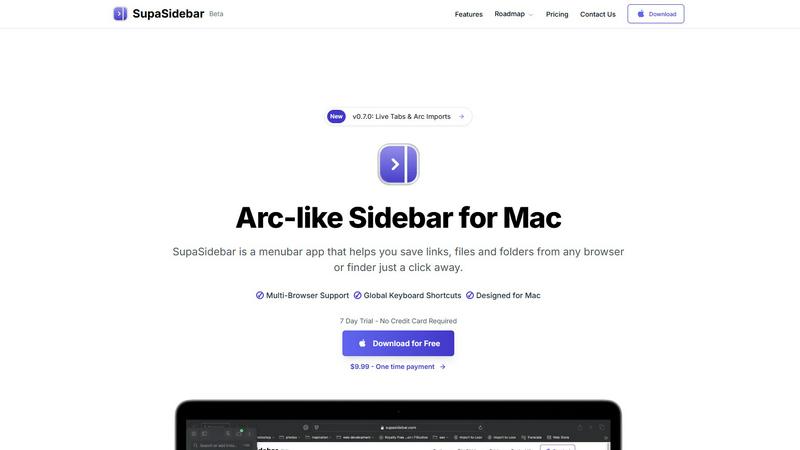
SupaSidebar is a Mac menubar app that streamlines saving and accessing links, files, and folders effortlessly.
Last updated: February 28, 2026
Visual Comparison
ScopeSnap

SupaSidebar
Feature Comparison
ScopeSnap
AI-Powered Scope Generation
This core feature ingests raw, unstructured text from various sources like call transcripts, Slack exports, or handwritten notes. Using advanced language models, it automatically identifies key requirements, user actions, and system functionalities, structuring them into a preliminary project backlog complete with epics and detailed scope items. It intelligently flags assumptions and surfaces open questions for the team to review, providing a powerful head start on scope definition.
Interactive Scope Refinement Board
The generated scope is presented in a dynamic, kanban-style board interface where teams can collaboratively review, edit, and organize items. This feature allows for direct manipulation of the backlog: dragging items between stages, breaking down large epics, assigning development roles (e.g., Frontend, Backend, DevOps), and attaching custom time or complexity estimates to each task, ensuring every aspect of the project is quantified.
Automated Proposal & SOW Document Builder
Once the scope is finalized and estimated, this feature automates the creation of client-facing documentation. Users can select a template (Proposal or Statement of Work), and ScopeSnap populates it with the structured scope, estimates, assumptions, and defined deliverables. The output is a polished, professional PDF or shareable document, eliminating hours of manual copying, pasting, and formatting from disparate sources.
Integration-First Data Context
Understanding that discovery happens across tools, ScopeSnap is built with compatibility in mind. It supports direct paste-in from a wide array of sources and is designed for a workflow that sits alongside communication platforms like Zoom, Google Meet, email clients, and note-taking apps. This ensures all relevant project context can be easily aggregated into the scoping engine without disruptive context switching.
SupaSidebar
Integrated Browser Compatibility
SupaSidebar works with all major browsers, including Safari, Chrome, Firefox, Brave, and Arc. This cross-browser functionality ensures that no matter where you are saving or accessing your resources, they remain at your fingertips, enhancing your productivity without the need for multiple extensions or applications.
Global Keyboard Shortcuts
Designed with efficiency in mind, SupaSidebar offers intuitive global keyboard shortcuts such as ⌘ + ⌃ + S for saving items and ⌘ + ⌃ + C for copying URLs. These shortcuts allow users to perform actions quickly, minimizing the time spent navigating and maximizing focus on actual tasks.
Recent Sites Tracking
SupaSidebar automatically tracks every website you've accessed within the last 48 hours. This feature allows users to find their work instantly without having to remember URLs or sift through browser history, streamlining the research process and enhancing productivity.
Pinned Items for Quick Access
The ability to pin favorite links, files, and folders at the top of your sidebar ensures that your most important resources are readily accessible. This feature reduces the friction of searching through long lists, enabling faster access to frequently used items and keeping your workflow uninterrupted.
Use Cases
ScopeSnap
Freelance Developer Client Onboarding
For solo developers, ScopeSnap streamlines the process of converting initial client discussions into a fixed-scope proposal. After a discovery call, the freelancer can paste their notes and meeting transcript into the tool to quickly generate a structured scope, identify edge cases, and produce a credible, detailed estimate and SOW to secure the project with clear boundaries and expectations.
Software Agency Pre-Sales Scoping
Agencies can use ScopeSnap to bring consistency and speed to their sales engineering phase. Sales teams can input notes from multiple stakeholder interviews, and the platform will synthesize a unified scope document. This allows for rapid iteration with internal technical leads to validate feasibility and cost before presenting a polished, accurate proposal to the prospective client.
Technical Consultant Requirement Analysis
Consultants tasked with defining project specifications for third-party teams can use ScopeSnap as an analysis tool. By processing all gathered business and technical requirements, the AI helps identify gaps, dependencies, and implicit assumptions, enabling the consultant to deliver a comprehensive, well-structured scope of work document to the development team for execution.
Iterative Project Scope Refinement
For projects following agile or iterative methodologies, ScopeSnap can be used at the start of each new phase or sprint. Teams can feed in notes from refinement sessions or user feedback to quickly generate and estimate the backlog for the upcoming cycle, maintaining a living document that accurately reflects the evolving project trajectory.
SupaSidebar
For Researchers
Researchers can benefit significantly from SupaSidebar by easily saving and organizing a plethora of links, documents, and articles. The quick access to recent sites and pinned favorites allows them to streamline their research process, making it faster to compile resources and citations.
For Content Creators
Content creators can utilize SupaSidebar to manage multiple projects simultaneously. By using the sidebar to organize links to inspiration, articles, and media assets, they can enhance their creative workflow and focus on producing quality content without losing track of essential resources.
For Multitaskers
For users who juggle various tasks, SupaSidebar provides a centralized location for quick access to apps, websites, and files. The fast search functionality ensures that they can find what they need in seconds, making it an indispensable tool for anyone with a busy schedule.
For Students
Students can leverage SupaSidebar to keep all their study materials organized. By saving lecture notes, research papers, and important links in one accessible sidebar, they can easily navigate their academic resources, leading to improved efficiency and better study habits.
Overview
About ScopeSnap
ScopeSnap is an AI-powered scoping and proposal platform engineered for freelance developers, technical consultants, and software development agencies. It directly addresses the critical, yet often chaotic, phase between client discovery and project kickoff. The core value proposition is transforming unstructured input—such as meeting transcripts, email threads, and scattered notes—into a structured, actionable, and estimatable project scope. By leveraging AI to parse context and generate a preliminary backlog of epics and user stories, ScopeSnap mitigates the risk of missed requirements and vague deliverables that plague custom software estimation. The platform provides a centralized workspace to iteratively refine this scope, assign roles, set time estimates, and resolve ambiguities. Finally, it seamlessly compiles the polished scope into client-ready professional documents like Proposals or Statements of Work (SOW). This end-to-end workflow is designed for integration into modern development practices, replacing manual, error-prone processes with a systematic, tech-stack compatible tool that ensures clarity from the first conversation to the signed contract.
About SupaSidebar
SupaSidebar is an innovative menubar application designed exclusively for Mac users, revolutionizing how you manage and access your digital resources. This beautifully crafted sidebar enhances productivity by allowing you to save, organize, and retrieve links, files, and folders with unparalleled ease. Drawing inspiration from the user-centric design principles of the Arc browser, SupaSidebar integrates seamlessly with all major browsers, including Safari, Chrome, Firefox, Brave, and Arc itself. Whether you're a researcher, a creator, or a multitasker, SupaSidebar is tailored to meet your needs by keeping your most important resources at your fingertips. Its intuitive keyboard shortcuts streamline your workflow, enabling you to save or copy URLs effortlessly, thus minimizing distractions from navigating through multiple tabs or applications. With features like real-time tab visibility and automatic tracking of recently accessed sites, SupaSidebar transforms your digital workspace into a more efficient and organized environment.
Frequently Asked Questions
ScopeSnap FAQ
What types of input does ScopeSnap accept for scope generation?
ScopeSnap is designed to process unstructured text from a wide variety of sources common in the discovery phase. You can directly paste in content from video call transcripts (e.g., Otter.ai, Rev), email correspondence, notes from apps like Notion or Google Docs, bullet-point lists, and even rough voice memo transcriptions. The AI is optimized to parse conversational language and extract actionable requirements.
How does ScopeSnap handle different tech stacks and project types?
The platform is technology-agnostic in its core scoping function. It focuses on identifying functional requirements, user stories, and features rather than prescribing implementations. During the refinement stage, you assign roles and estimates based on your team's specific expertise—whether it's a React frontend, a Node.js backend, mobile development, or cloud architecture. The output documents are templated to suit various project types, from web apps to SaaS platforms.
Can I collaborate with my team or client within ScopeSnap?
ScopeSnap provides a collaborative workspace for internal team refinement, allowing members to review, edit, and estimate the scope board. Client-facing sharing is typically handled through the generated Proposal or SOW documents, which are exported and sent via your existing communication channels. This maintains a clear separation between internal scoping work and the finalized client deliverable.
Is the AI-generated scope final, or does it require human review?
The AI-generated scope is a powerful starting point, but it is not final. It is explicitly designed for human-in-the-loop refinement. The platform surfaces open questions and flagged assumptions precisely to guide your review. Technical leads and project managers must critically review, adjust, break down, and estimate each item to ensure technical accuracy, completeness, and alignment with the client's true needs before generating a final proposal.
SupaSidebar FAQ
Is SupaSidebar a browser extension?
No, SupaSidebar is a menubar application designed for Mac that works independently from browser extensions. It integrates with multiple browsers for seamless access to your resources.
Which browsers does SupaSidebar work with?
SupaSidebar supports all major browsers including Safari, Chrome, Firefox, Brave, and Arc, allowing users to save and access their resources across different platforms effortlessly.
What macOS version do I need?
SupaSidebar requires macOS 13 or later to ensure optimal performance and access to the latest features and updates.
Where is my data stored?
Your data is stored locally on your Mac, ensuring that nothing leaves your device. SupaSidebar prioritizes user privacy and data security, meaning you can trust that your information remains confidential.
Alternatives
ScopeSnap Alternatives
ScopeSnap is a project scoping and proposal generation tool in the productivity and management software category. It uses AI to help freelance developers and software agencies transform initial client discussions into structured, estimatable tasks and professional proposals. Users often explore alternatives to ScopeSnap for various reasons, such as specific budget constraints, the need for different feature sets, or deeper integration with their existing tech stack and project management ecosystem. The right tool must align with a team's operational workflow and technical environment. When evaluating alternatives, key considerations include the platform's ability to integrate with your current tools, its compatibility with your development methodology, and how it handles the iterative refinement of technical requirements. The focus should be on finding a solution that seamlessly fits into your existing software development lifecycle.
SupaSidebar Alternatives
SupaSidebar is a versatile menubar app designed for Mac users, falling under the productivity and management category. It streamlines the process of saving and accessing links, files, and folders across multiple browsers, thereby enhancing user efficiency. As users engage with various digital tasks, they often seek alternatives to SupaSidebar for reasons such as pricing considerations, the need for additional features, or compatibility with different platforms. When searching for an alternative, users should prioritize features that align with their workflow preferences, ensuring that the app simplifies their browsing experience rather than complicates it. Additionally, compatibility with various browsers and a user-friendly interface are essential factors, as they directly impact productivity and overall satisfaction.