
Perkoon vs TinyFast
Side-by-side comparison to help you choose the right product.

Perkoon enables free, unlimited peer-to-peer file transfers without signup, keeping your files private and secure.
Last updated: March 4, 2026

TinyFast
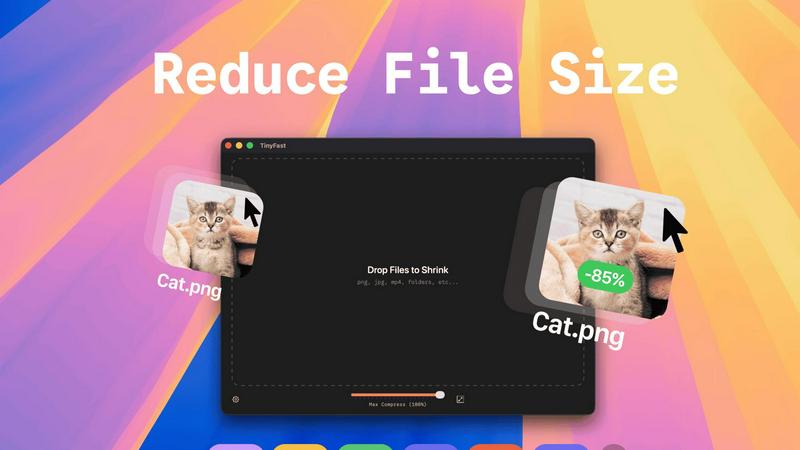
Effortlessly compress images, videos, and PDFs on your Mac with TinyFast's secure drag-and-drop functionality.
Last updated: February 28, 2026
Visual Comparison
Perkoon

TinyFast
Feature Comparison
Perkoon
Peer-to-Peer File Transfers
Perkoon utilizes advanced peer-to-peer technology to enable direct file transfers between users' browsers. This eliminates size limits and ensures that files are sent securely without ever passing through central servers, providing a truly private experience.
Encrypted Cloud Storage
For instances when the recipient is offline, Perkoon offers a secure cloud storage option where files are temporarily held. This feature is encrypted to enhance security, and users are only charged for the storage costs, ensuring transparency in pricing.
AI Integration and Automation
Perkoon is designed with the modern user in mind, featuring built-in tools that allow AI agents to interact directly with the service. This eliminates the need for outdated screen-scraping techniques, making file transfers more efficient and user-friendly.
Unique Referral Program
Perkoon has implemented an innovative referral program that rewards users for sharing the service with others. When you refer someone who signs up and makes a transfer, both you and the new user receive bonus storage, fostering a community of users who benefit from each other's participation.
TinyFast
Batch & Drag-Drop Shrink
TinyFast enables users to compress entire folders in one go, significantly enhancing productivity. By simply dragging and dropping a folder, users can achieve optimized outputs within seconds, making it an efficient choice for bulk file processing.
Blazing-Fast Compression
Harnessing optimized native engines built for speed, TinyFast allows users to shrink large files in seconds. Unlike online compression tools that require uploads and downloads, TinyFast eliminates waiting times, providing instant results for a smoother workflow.
Resize Resolution
For users who need to manage file sizes without sacrificing quality, TinyFast offers an automatic resizing feature for images and videos. This functionality allows users to set desired resolutions, ensuring that files are optimized for both size and visual clarity.
100% Local & Private
Privacy is a cornerstone of TinyFast's design. The application guarantees that files never leave the user's machine, as it requires no uploads to cloud servers. This local processing ensures total confidentiality, making it an essential tool for those with sensitive information.
Use Cases
Perkoon
Transferring Large Files
Whether you are sending high-resolution videos, large datasets, or extensive presentations, Perkoon allows you to transfer files of any size without hassle. The P2P technology ensures that these files are sent quickly and securely.
Collaborating with Teams
For teams working remotely, Perkoon provides an efficient way to share files among team members. With its easy-to-use interface and direct file transfers, collaboration becomes seamless, enabling teams to focus on their projects rather than on file-sharing complications.
Sending Files to Clients
Freelancers and businesses can use Perkoon to send important documents to clients without worrying about data privacy or size limitations. The service guarantees that files remain confidential and secure during the transfer process.
AI-Assisted File Management
Developers and tech enthusiasts can leverage Perkoon’s AI integration to automate file transfer processes. This allows for smoother workflows and minimizes the need for manual interventions, making it an ideal solution for tech-savvy users.
TinyFast
Efficient File Management for Designers
Graphic designers often work with high-resolution images that can take up significant storage space. TinyFast allows them to compress files efficiently, maintaining quality while freeing up storage for additional projects.
Video Optimization for Content Creators
Content creators frequently deal with large video files that require compression for faster uploads to platforms like YouTube. TinyFast allows for quick video optimization, enabling creators to streamline their publishing process without sacrificing video quality.
Document Handling for Developers
Developers often need to manage large documentation files, which can hinder collaboration and storage management. TinyFast can compress PDF and DOCX files quickly, making it easier to share documentation without overwhelming email systems or cloud storage.
Audio File Compression for Musicians
Musicians and podcasters who work with large audio files can benefit from TinyFast's capabilities. By compressing MP3 files, they can manage their libraries more effectively and ensure faster sharing of content across platforms.
Overview
About Perkoon
Perkoon is a revolutionary file transfer service designed to simplify the way you send files. It caters to users who are frustrated with traditional file-sharing platforms that impose artificial limits, require mandatory sign-ups, and often treat user data as a product. With Perkoon, you can send files effortlessly from point A to point B, ensuring a hassle-free experience. The service operates on a peer-to-peer (P2P) model for real-time transfers, allowing you to send files directly between browsers without the need for accounts or central servers. This not only ensures privacy but also means that users can send files of any size for free. When recipients are offline, Perkoon offers secure cloud storage as a paid option. Notably, Perkoon integrates seamlessly with AI tools, providing automation capabilities without requiring complex screen-scraping methods. With its straightforward command-line interface (CLI), Perkoon stands out as a powerful solution for both individuals and AI systems, maintaining a strong focus on user privacy and data security.
About TinyFast
TinyFast is an innovative macOS application specifically designed for the fast and secure compression of various file types. Whether you're dealing with images, videos, or documents, TinyFast provides a seamless solution that prioritizes both speed and privacy. With its intuitive drag-and-drop interface, users can effortlessly compress file formats such as PNG, JPEG, MP4, MOV, PDF, SVG, WebP, MP3, and GIF without the need for uploads to cloud services. This makes TinyFast an ideal choice for developers, designers, and creators who handle sensitive data and require confidentiality in their workflows. Operating entirely offline, TinyFast ensures that your files remain secure on your device, allowing you to save valuable time and storage space without compromising data integrity. With an emphasis on performance, TinyFast is a must-have tool for anyone looking to optimize their file management processes quickly and securely.
Frequently Asked Questions
Perkoon FAQ
Is Perkoon really free?
Yes, Perkoon offers a free peer-to-peer transfer service that incurs no costs. The only charge applies to the cloud storage feature, which is used when the recipient is offline.
How does P2P transfer work?
P2P transfers allow files to be sent directly from one user's browser to another's. This means files do not go through a central server, ensuring both privacy and speed.
Can I use Perkoon with my AI applications?
Absolutely! Perkoon is designed to integrate with AI applications seamlessly. You can utilize its API for automation without resorting to outdated screen-scraping methods.
What happens if the recipient is offline?
If the recipient is offline, Perkoon will hold the file in encrypted cloud storage until they become available. You can choose to use this feature at a nominal fee, ensuring that your files are safe and accessible later.
TinyFast FAQ
Is TinyFast safe to use?
Yes, TinyFast is designed with privacy in mind. It operates entirely offline, ensuring that your files never leave your device, providing a secure solution for file compression.
What file types does TinyFast support?
TinyFast supports a wide range of file types, including images (PNG, JPEG, GIF), videos (MP4, MOV), documents (PDF, DOCX), code files (JS, CSS, JSON), and audio files (MP3).
Can I compress multiple files at once?
Absolutely! TinyFast has a batch processing feature that allows you to drag and drop entire folders for compression, optimizing multiple files in seconds.
Is there a free version of TinyFast?
Yes, TinyFast offers a free version that allows users to compress up to 5 files per day while accessing all features, making it a great option for light users.
Alternatives
Perkoon Alternatives
Perkoon is a peer-to-peer file transfer service designed to streamline the process of sharing files without unnecessary complications. It stands out in the productivity and management category by offering free, unlimited transfers that prioritize user privacy and data security. As users increasingly seek hassle-free solutions, they often explore alternatives that may better suit their specific needs, whether due to pricing concerns, feature sets, or platform compatibility. When searching for a suitable alternative to Perkoon, it's essential to consider various factors such as ease of use, security protocols, and integration capabilities with existing workflows. Users should look for services that maintain a strong focus on privacy, offer powerful functionality, and provide seamless compatibility across different devices and operating systems to ensure a smooth file transfer experience.
TinyFast Alternatives
TinyFast is a cutting-edge macOS application designed for the swift and secure compression of various file types, including images, videos, and documents. As part of the tech tools category, it caters to developers, designers, and creators who prioritize privacy and efficiency in their workflows. Users often seek alternatives to TinyFast for reasons such as pricing, specific feature requirements, or compatibility with different operating systems. When choosing an alternative, it’s essential to consider factors such as the range of file types supported, compression speed, user interface design, and the level of security offered. Additionally, reviewing whether the solution operates offline or requires internet connectivity can significantly impact your decision based on your privacy concerns and workflow needs.