
TinyFast
Effortlessly compress images, videos, and PDFs on your Mac with TinyFast's secure drag-and-drop functionality.
Visit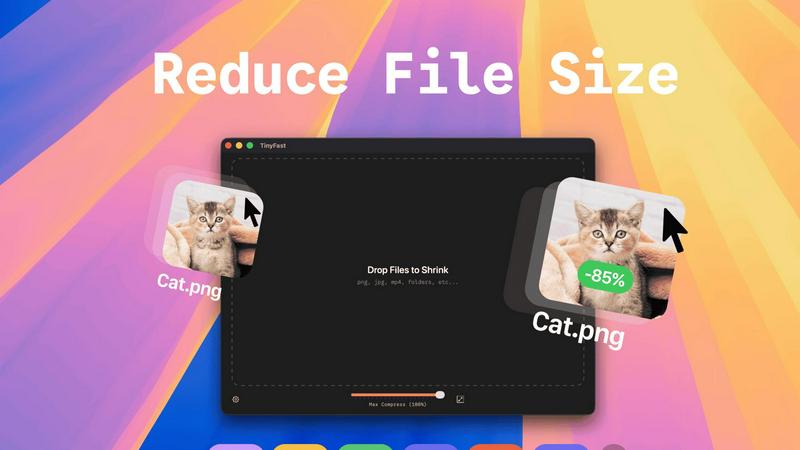
About TinyFast
TinyFast is an innovative macOS application specifically designed for the fast and secure compression of various file types. Whether you're dealing with images, videos, or documents, TinyFast provides a seamless solution that prioritizes both speed and privacy. With its intuitive drag-and-drop interface, users can effortlessly compress file formats such as PNG, JPEG, MP4, MOV, PDF, SVG, WebP, MP3, and GIF without the need for uploads to cloud services. This makes TinyFast an ideal choice for developers, designers, and creators who handle sensitive data and require confidentiality in their workflows. Operating entirely offline, TinyFast ensures that your files remain secure on your device, allowing you to save valuable time and storage space without compromising data integrity. With an emphasis on performance, TinyFast is a must-have tool for anyone looking to optimize their file management processes quickly and securely.
Features of TinyFast
Batch & Drag-Drop Shrink
TinyFast enables users to compress entire folders in one go, significantly enhancing productivity. By simply dragging and dropping a folder, users can achieve optimized outputs within seconds, making it an efficient choice for bulk file processing.
Blazing-Fast Compression
Harnessing optimized native engines built for speed, TinyFast allows users to shrink large files in seconds. Unlike online compression tools that require uploads and downloads, TinyFast eliminates waiting times, providing instant results for a smoother workflow.
Resize Resolution
For users who need to manage file sizes without sacrificing quality, TinyFast offers an automatic resizing feature for images and videos. This functionality allows users to set desired resolutions, ensuring that files are optimized for both size and visual clarity.
100% Local & Private
Privacy is a cornerstone of TinyFast's design. The application guarantees that files never leave the user's machine, as it requires no uploads to cloud servers. This local processing ensures total confidentiality, making it an essential tool for those with sensitive information.
Use Cases of TinyFast
Efficient File Management for Designers
Graphic designers often work with high-resolution images that can take up significant storage space. TinyFast allows them to compress files efficiently, maintaining quality while freeing up storage for additional projects.
Video Optimization for Content Creators
Content creators frequently deal with large video files that require compression for faster uploads to platforms like YouTube. TinyFast allows for quick video optimization, enabling creators to streamline their publishing process without sacrificing video quality.
Document Handling for Developers
Developers often need to manage large documentation files, which can hinder collaboration and storage management. TinyFast can compress PDF and DOCX files quickly, making it easier to share documentation without overwhelming email systems or cloud storage.
Audio File Compression for Musicians
Musicians and podcasters who work with large audio files can benefit from TinyFast's capabilities. By compressing MP3 files, they can manage their libraries more effectively and ensure faster sharing of content across platforms.
Frequently Asked Questions
Is TinyFast safe to use?
Yes, TinyFast is designed with privacy in mind. It operates entirely offline, ensuring that your files never leave your device, providing a secure solution for file compression.
What file types does TinyFast support?
TinyFast supports a wide range of file types, including images (PNG, JPEG, GIF), videos (MP4, MOV), documents (PDF, DOCX), code files (JS, CSS, JSON), and audio files (MP3).
Can I compress multiple files at once?
Absolutely! TinyFast has a batch processing feature that allows you to drag and drop entire folders for compression, optimizing multiple files in seconds.
Is there a free version of TinyFast?
Yes, TinyFast offers a free version that allows users to compress up to 5 files per day while accessing all features, making it a great option for light users.
Explore more in this category:
Similar to TinyFast

Free collection of online developer utilities, code formatters, and digital converters designed to streamline your daily workflow.

Online tally counter for tracking attendance, workouts, inventory, visitors, sports scores, habits, and everyday counting tasks.

The #1 Native Form Builder Plugin for Framer - No Code, No Embeds, No External Platforms.

Free AI attractiveness test and face analysis with private, on-device photo processing.

A free launch checklist for SaaS, apps, AI tools and more. Every step says why it matters and when you can skip it.


Turn any image into editable layers with AI.

Private browser-based watermark tools for photos and PDFs, with eleven free workflows and local media processing.