
SureThing.io vs TinyFast
Side-by-side comparison to help you choose the right product.

SureThing.io
SureThing.io automates business management with an intelligent agent that learns your preferences and works seamlessly while you rest.
Last updated: March 19, 2026

TinyFast
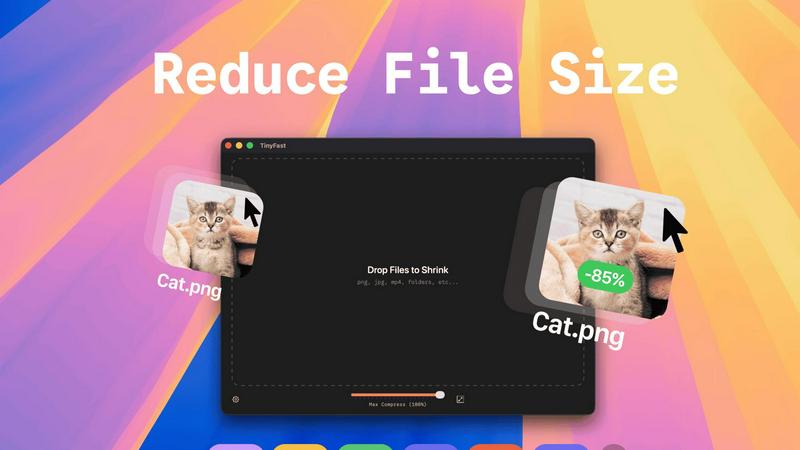
Effortlessly compress images, videos, and PDFs on your Mac with TinyFast's secure drag-and-drop functionality.
Last updated: February 28, 2026
Visual Comparison
SureThing.io

TinyFast
Feature Comparison
SureThing.io
Proactive Inbox Management
SureThing actively monitors your email, identifying important messages and drafting replies that reflect your tone and style. This feature ensures timely responses, freeing you from the stress of managing your inbox manually.
Persistent Memory
The state-of-the-art agentic memory feature allows SureThing to retain information about your goals, preferences, and work patterns over time. As you continue to use the agent, it learns and adapts, reducing the need for repetitive explanations.
Schedule Optimization
SureThing integrates seamlessly with your calendar, helping to organize meetings and appointments efficiently. It analyzes your schedule to suggest optimal times for tasks and meetings, ensuring you are always in control of your time.
Cross-Application Action
By connecting to various apps and tools, SureThing can take actions across your digital ecosystem. Whether it's updating project management software or posting on social media, it ensures that your tasks are completed without direct input.
TinyFast
Batch & Drag-Drop Shrink
TinyFast enables users to compress entire folders in one go, significantly enhancing productivity. By simply dragging and dropping a folder, users can achieve optimized outputs within seconds, making it an efficient choice for bulk file processing.
Blazing-Fast Compression
Harnessing optimized native engines built for speed, TinyFast allows users to shrink large files in seconds. Unlike online compression tools that require uploads and downloads, TinyFast eliminates waiting times, providing instant results for a smoother workflow.
Resize Resolution
For users who need to manage file sizes without sacrificing quality, TinyFast offers an automatic resizing feature for images and videos. This functionality allows users to set desired resolutions, ensuring that files are optimized for both size and visual clarity.
100% Local & Private
Privacy is a cornerstone of TinyFast's design. The application guarantees that files never leave the user's machine, as it requires no uploads to cloud servers. This local processing ensures total confidentiality, making it an essential tool for those with sensitive information.
Use Cases
SureThing.io
Optimizing Team Collaboration
In a team environment, SureThing can help manage communications and schedules, ensuring that everyone is aligned. It can facilitate project updates and reminders, keeping team members informed without overwhelming them.
Supporting Solo Entrepreneurs
Solo founders can leverage SureThing to handle multiple aspects of their business, from managing client communications to tracking project progress. This allows them to focus on strategic growth while the AI manages day-to-day operations.
Enhancing Customer Support
Organizations can utilize SureThing to automate responses to common customer inquiries, maintaining a level of personalized communication while improving response times. This ensures that customers feel valued without overburdening support staff.
Streamlining Event Planning
For professionals involved in event planning, SureThing can manage logistics, coordinate schedules, and communicate with vendors seamlessly. Its proactive nature means it can anticipate needs and address potential issues before they arise.
TinyFast
Efficient File Management for Designers
Graphic designers often work with high-resolution images that can take up significant storage space. TinyFast allows them to compress files efficiently, maintaining quality while freeing up storage for additional projects.
Video Optimization for Content Creators
Content creators frequently deal with large video files that require compression for faster uploads to platforms like YouTube. TinyFast allows for quick video optimization, enabling creators to streamline their publishing process without sacrificing video quality.
Document Handling for Developers
Developers often need to manage large documentation files, which can hinder collaboration and storage management. TinyFast can compress PDF and DOCX files quickly, making it easier to share documentation without overwhelming email systems or cloud storage.
Audio File Compression for Musicians
Musicians and podcasters who work with large audio files can benefit from TinyFast's capabilities. By compressing MP3 files, they can manage their libraries more effectively and ensure faster sharing of content across platforms.
Overview
About SureThing.io
SureThing.io is an advanced autonomous AI agent designed to transform the way individuals and teams manage their workloads. Unlike traditional AI chatbots that require prompts to function, SureThing operates proactively, continuously engaging with your digital environment. It monitors your inbox, drafts responses in your unique voice, and manages your calendar while you concentrate on your core tasks. The AI agent's persistent memory allows it to remember your preferences, contacts, and long-term goals, thus streamlining your workflow over time. Built with enterprise-level security, SureThing is SOC 2 certified and Google CASA Tier 2 compliant, ensuring that users can trust it with sensitive information. Ideal for busy professionals, solo founders, and tech-savvy teams, SureThing offers a reliable solution for those looking to enhance productivity and efficiency without the constant need for oversight.
About TinyFast
TinyFast is an innovative macOS application specifically designed for the fast and secure compression of various file types. Whether you're dealing with images, videos, or documents, TinyFast provides a seamless solution that prioritizes both speed and privacy. With its intuitive drag-and-drop interface, users can effortlessly compress file formats such as PNG, JPEG, MP4, MOV, PDF, SVG, WebP, MP3, and GIF without the need for uploads to cloud services. This makes TinyFast an ideal choice for developers, designers, and creators who handle sensitive data and require confidentiality in their workflows. Operating entirely offline, TinyFast ensures that your files remain secure on your device, allowing you to save valuable time and storage space without compromising data integrity. With an emphasis on performance, TinyFast is a must-have tool for anyone looking to optimize their file management processes quickly and securely.
Frequently Asked Questions
SureThing.io FAQ
How does SureThing.io ensure data security?
SureThing is SOC 2 certified and Google CASA Tier 2 compliant, which means it adheres to strict security protocols to protect your data and privacy while using the platform.
Can I customize SureThing to fit my specific needs?
Yes, SureThing is designed to learn and adapt based on your preferences and workflows. The more you interact with it, the better it understands your unique requirements.
Is SureThing suitable for large enterprises?
Absolutely. SureThing's enterprise-level features and security compliance make it a robust solution for organizations of all sizes, especially those requiring reliable task management and communication support.
What integrations does SureThing support?
SureThing connects with various applications and tools commonly used in professional settings, allowing it to take action across your digital workspace effortlessly and enhance your productivity.
TinyFast FAQ
Is TinyFast safe to use?
Yes, TinyFast is designed with privacy in mind. It operates entirely offline, ensuring that your files never leave your device, providing a secure solution for file compression.
What file types does TinyFast support?
TinyFast supports a wide range of file types, including images (PNG, JPEG, GIF), videos (MP4, MOV), documents (PDF, DOCX), code files (JS, CSS, JSON), and audio files (MP3).
Can I compress multiple files at once?
Absolutely! TinyFast has a batch processing feature that allows you to drag and drop entire folders for compression, optimizing multiple files in seconds.
Is there a free version of TinyFast?
Yes, TinyFast offers a free version that allows users to compress up to 5 files per day while accessing all features, making it a great option for light users.
Alternatives
SureThing.io Alternatives
SureThing.io is an autonomous AI-driven business management tool designed to enhance productivity and streamline workflows. This platform operates within the productivity and management category, offering users a proactive assistant that monitors communications, manages schedules, and tracks projects, all while adapting to individual preferences. Users often seek alternatives to SureThing.io for various reasons, including cost considerations, specific feature requirements, or compatibility with different platforms and applications. When evaluating alternatives, it's essential to consider factors such as the depth of AI capabilities, integration with existing tools, user-friendliness, and the reliability of the service, ensuring that the chosen solution aligns with your unique operational needs.
TinyFast Alternatives
TinyFast is a cutting-edge macOS application designed for the swift and secure compression of various file types, including images, videos, and documents. As part of the tech tools category, it caters to developers, designers, and creators who prioritize privacy and efficiency in their workflows. Users often seek alternatives to TinyFast for reasons such as pricing, specific feature requirements, or compatibility with different operating systems. When choosing an alternative, it’s essential to consider factors such as the range of file types supported, compression speed, user interface design, and the level of security offered. Additionally, reviewing whether the solution operates offline or requires internet connectivity can significantly impact your decision based on your privacy concerns and workflow needs.