
Easy Watermark Remover
Remove Google Gemini watermarks and SynthID online instantly with AI Smart Repair or Quick Crop, no signup or extension needed.
Visit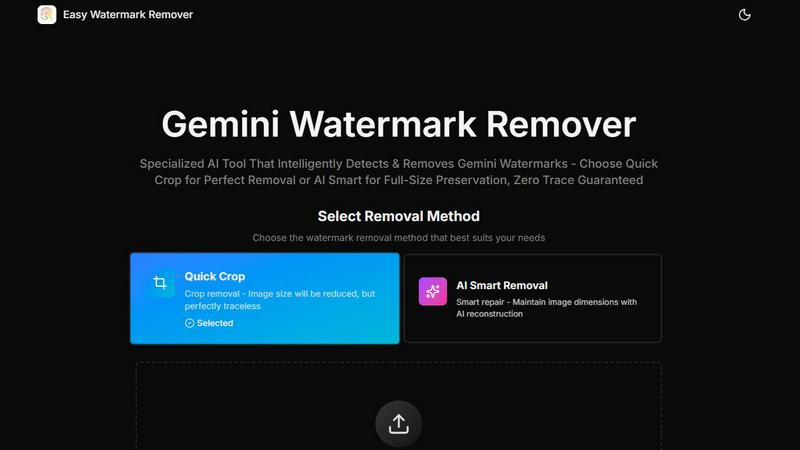
About Easy Watermark Remover
Easy Watermark Remover is a specialized, browser-based online tool engineered to remove Gemini AI watermarks from images generated by Imagen 3. Unlike generic object removal tools, this utility is specifically designed to handle the unique challenges posed by Gemini exports, which feature a visible lightning logo in the lower-right corner and an invisible SynthID digital watermark. The tool offers two distinct removal methodologies: Quick Crop for instant, traceless removal by trimming the affected area, and AI Smart Removal, which leverages deep learning pixel reconstruction to intelligently fill the watermark region while preserving the original image dimensions. All processing is executed entirely within the user's browser, ensuring that no image data is ever uploaded to an external server, a critical feature for maintaining data privacy and compliance. The tool supports common web formats including PNG, JPG, and WebP, with a file size limit of up to 16MB. It enables batch processing, operates seamlessly across all devices, and exports clean images in their original quality without requiring any signup, account creation, or software installation. This makes Easy Watermark Remover an ideal solution for content creators, digital marketers, e-commerce professionals, and anyone who regularly works with AI-generated imagery and needs a fast, reliable, and private method for removing Gemini watermarks.
Features of Easy Watermark Remover
Quick Crop Removal
This method provides the fastest path to a clean image by precisely trimming the lower-right corner where the visible Gemini watermark is typically located. It is ideal for images where the corner contains only empty space, sky, plain backgrounds, or background blur that can be safely removed without affecting the composition. The result is a perfectly traceless image that shows no signs of alteration, making it suitable for social media posts, thumbnails, and other use cases where a slight reduction in canvas size is acceptable. This approach requires no AI processing and delivers instant results.
AI Smart Removal
For images where preserving the original dimensions is critical, the AI Smart Removal feature uses deep learning pixel reconstruction to intelligently fill the watermark area. This method analyzes the surrounding pixels, including gradients, textures, lighting, and color, to generate a seamless repair that blends naturally with the rest of the image. It is specifically designed to handle complex scenarios where the watermark overlaps subject edges, product shadows, layout details, or other important visual elements. The AI is trained to be corner-aware, focusing its reconstruction efforts on the predictable lower-right region where Gemini watermarks appear.
Local Processing for Privacy
All image processing is performed entirely within the user's browser using client-side JavaScript and WebAssembly technologies. No image data is ever transmitted to an external server, stored in the cloud, or logged by the application. This architecture ensures complete data privacy and security, making the tool compliant with strict data handling policies. Users can process sensitive or proprietary images without any concern about data breaches, third-party access, or unauthorized use of their content. This local processing model also eliminates upload wait times and enables offline functionality after the initial page load.
Batch Processing and Format Support
The tool supports efficient batch processing, allowing users to select and process multiple images in a single workflow. It accepts the three most common web image formats: PNG, JPG, and WebP, with a maximum file size of 16MB per image. The batch processing pipeline maintains consistent output quality across all files, and each image is processed independently to prevent cross-contamination or errors. Exported images retain their original quality, resolution, and format, ensuring that the cleaned files are production-ready for immediate use in websites, marketing materials, or content management systems.
Use Cases of Easy Watermark Remover
Content Creation and Social Media Management
Content creators who regularly use Gemini AI to generate visual assets for social media platforms, blog posts, and video thumbnails can use Easy Watermark Remover to quickly clean their images. The Quick Crop method is ideal for social media content where a slight reduction in canvas size is acceptable, and the tool's batch processing capability enables creators to prepare multiple assets for a campaign in a single session. The local processing ensures that unreleased content remains private and secure.
E-commerce Product Photography
E-commerce professionals who use AI-generated product mockups and lifestyle images need to remove watermarks while preserving the exact dimensions required by their platform. The AI Smart Removal feature is critical here, as it can reconstruct areas where the watermark overlaps product edges, shadows, or layout elements. This ensures that product images maintain their professional appearance and fit perfectly into predefined template slots on platforms like Amazon, Shopify, or WooCommerce without any cropping or distortion.
Marketing and Advertising Asset Preparation
Marketing teams working on presentation slides, digital ads, and print materials often require images with exact dimensions and pristine visual quality. Easy Watermark Remover's AI Smart Removal method allows these professionals to remove watermarks from AI-generated graphics without altering the canvas size, ensuring that the cleaned images integrate seamlessly into existing layouts. The tool's support for high-resolution files up to 16MB accommodates the large formats commonly used in advertising and presentation work.
Design and Layout Prototyping
Graphic designers and UI/UX professionals who use AI-generated imagery as placeholders or base assets in their design workflows can benefit from the tool's dimension-aware removal options. The ability to choose between cropping and AI reconstruction allows designers to select the method that best fits their current project requirements. For layout-sensitive designs where exact pixel dimensions are critical, AI Smart Removal preserves the canvas, while Quick Crop can be used for less constrained projects where speed is the priority.
Frequently Asked Questions
What is the difference between Quick Crop and AI Smart Removal?
Quick Crop removes the Gemini watermark by trimming the lower-right corner of the image, which reduces the overall canvas size but provides an instant, traceless result. AI Smart Removal uses deep learning to reconstruct the watermark area pixel by pixel, maintaining the original image dimensions and canvas size. Quick Crop is best for images where the corner contains empty space or plain backgrounds, while AI Smart Removal is recommended when the watermark overlaps important visual elements like subject edges, product shadows, or text.
Does Easy Watermark Remover store or upload my images?
No. All image processing is performed entirely within your browser using local computing resources. Your images are never uploaded to any server, stored in the cloud, or accessed by any third party. This local processing model ensures complete privacy and security for your content, making the tool suitable for processing sensitive, proprietary, or unreleased images without any risk of data breaches or unauthorized access.
What image formats and sizes are supported?
The tool supports PNG, JPG, and WebP image formats with a maximum file size of 16MB per image. These three formats cover the vast majority of web and graphic design use cases. The tool also supports batch processing, allowing you to select and process multiple images simultaneously. Exported images retain their original format, quality, and resolution, ensuring that the cleaned files are immediately usable in your workflow.
Can I use this tool on mobile devices or tablets?
Yes, Easy Watermark Remover is a fully browser-based tool that works on all devices, including desktop computers, laptops, tablets, and smartphones. The interface is responsive and adapts to different screen sizes, allowing you to process images from any device with a modern web browser. No software installation, browser extensions, or app downloads are required to use the tool.
Explore more in this category:
Similar to Easy Watermark Remover

Face recognition API, a drop-in replacement for AWS Rekognition. Index, search, compare and detect faces, billed per photo with no subscription.

AI image generation and editing with sharp typography, native 2K output, and localized edits.

AI-powered image text editor to edit, replace, fix, or translate text in images while preserving the original font, color, size, and style.

A free browser-based toolkit for creating, cutting, converting, and previewing sprite sheet animations.

Free AI attractiveness test and face analysis with private, on-device photo processing.

Turn any image into editable layers with AI.

Private browser-based watermark tools for photos and PDFs, with eleven free workflows and local media processing.

Prompt-based image editing and generation for backgrounds, objects, text, products, posters, outpainting, styles, and Qwen Image workflows.