
HuntingPad
HuntingPad is an AI-driven Chrome extension that streamlines job applications by matching your resume and tracking.
VisitPublished on:
August 21, 2025
Pricing:
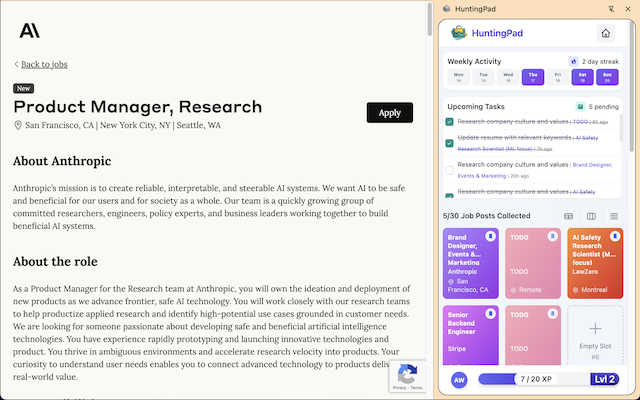
About HuntingPad
HuntingPad is a powerful Chrome extension designed to revolutionize the job search process for ambitious professionals, particularly in tech and management sectors. With the current job market becoming increasingly competitive, applicants find themselves navigating 50 or more job applications without a streamlined way to manage them. HuntingPad addresses this need by integrating seamlessly into the user's browser environment, allowing for a natural workflow that enhances productivity. By automating the capture, tracking, and analysis of job applications, it eliminates the administrative overhead that often bogs down job seekers. Moreover, HuntingPad prioritizes user privacy by storing all data locally on the device while providing AI-powered insights for resume matching and application strategies. This extension is not just another tool—it is a strategic advantage for developers managing complex tech stacks, managers overseeing multiple opportunities, and any professional looking to optimize their job search efforts.
Features of HuntingPad
One-Click Job Capture
With HuntingPad, users can save job postings from any site with a single click. This feature ensures that you can quickly gather job opportunities without the hassle of manual entry, allowing you to focus on applying.
Smart Reminders
Never miss a deadline again with HuntingPad's smart reminders. This feature alerts users about application deadlines and follow-up timings, helping to keep your job search organized and timely.
AI Insights for Customization
HuntingPad provides AI-generated insights to enhance your application strategy. It suggests resume tweaks based on the specific job you are applying for, ensuring that you stand out among the competition.
Local Data Storage for Privacy
Prioritizing user privacy, HuntingPad stores all captured data locally on your device. This means your job search information is secure and not exposed to third-party servers, giving you peace of mind.
Use Cases of HuntingPad
Streamlined Job Application Management
Professionals can use HuntingPad to track multiple applications across various job boards in one convenient location. This makes it easier to manage deadlines and follow-up actions.
Enhanced Resume Tailoring
Job seekers can utilize HuntingPad's AI insights to tailor their resumes for each specific role. This feature helps users present their qualifications in the best light, increasing their chances of landing interviews.
Efficient Networking and Follow-Up
With smart reminders, users can easily manage networking opportunities and follow-ups with recruiters, ensuring that no potential connections are overlooked during the job search.
Comprehensive Job Market Analysis
HuntingPad allows users to analyze trends in job postings and application success rates, helping them to adjust their strategies in real time based on market demands.
Frequently Asked Questions
How does HuntingPad integrate with my browser?
HuntingPad is a Chrome extension that integrates directly into your browsing experience. This means you can capture and manage job postings without switching between multiple applications.
Is my data safe with HuntingPad?
Yes, HuntingPad prioritizes user privacy by storing all data locally on your device. This ensures that your job search information remains confidential and secure.
Can I use HuntingPad on any job site?
Absolutely! HuntingPad allows you to save job postings from any career website, including LinkedIn, Indeed, and Glassdoor, making it versatile for all job seekers.
How quickly can I set up HuntingPad?
Setting up HuntingPad is incredibly quick and easy. You can install the extension and start using it within 30 seconds—no credit card required.
Similar to HuntingPad

Free YouTube transcripts on the web, a Chrome extension, and an API + MCP server so AI assistants can read YouTube.

No-code 2D game editor: visual node logic, drag-and-drop scenes, live preview. Exports to Windows, macOS, Linux, Android, iOS, Web.

Free collection of online developer utilities, code formatters, and digital converters designed to streamline your daily workflow.

Online tally counter for tracking attendance, workouts, inventory, visitors, sports scores, habits, and everyday counting tasks.

The #1 Native Form Builder Plugin for Framer - No Code, No Embeds, No External Platforms.

A free launch checklist for SaaS, apps, AI tools and more. Every step says why it matters and when you can skip it.

