
JustPDF
JustPDF is a privacy-first, browser-based toolkit offering 17 free PDF tools like merging, compressing, and converting without uploading files.
Visit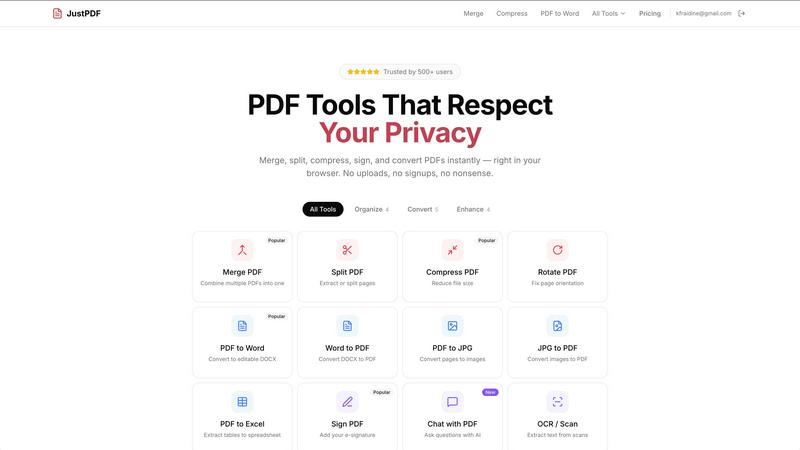
About JustPDF
JustPDF is a comprehensive online PDF tool suite that offers 17 professional-grade features designed to enhance your document management experience. Unlike traditional PDF services such as Smallpdf and iLovePDF, JustPDF processes all files directly within your web browser using JavaScript and WebAssembly, ensuring that your files never leave your device. This commitment to privacy and security means that you can work with sensitive documents without worrying about data breaches or unauthorized access. JustPDF caters to a wide range of users, including students, educators, and professionals, by providing essential functionalities such as PDF merging, splitting, compressing, and converting to various formats. The platform is FERPA-compliant, making it suitable for educational use. With a user-friendly interface, JustPDF allows users to drag and drop files for quick processing, and no account is required for the free tier, which offers three operations per day. For those who need more extensive access, a Pro plan starts at just $4 per month, providing unlimited functionality.
Features of JustPDF
Merge PDF
The Merge PDF feature allows users to combine multiple PDF documents into a single cohesive file. This is particularly useful for organizing documents, creating comprehensive reports, or consolidating information from different sources. Users can easily select the PDFs they wish to merge and rearrange them as needed before finalizing the process.
Split PDF
With the Split PDF function, users can extract specific pages from a PDF document or divide a large file into smaller, more manageable sections. This feature is ideal for cases where only particular pages are needed for distribution or review, enhancing document handling efficiency.
Compress PDF
The Compress PDF tool enables users to reduce the size of their PDF files without losing quality. This is especially beneficial for sharing documents via email or uploading them to platforms with file size restrictions. The process is quick and user-friendly, requiring just a drag-and-drop action.
Chat with PDF
The innovative Chat with PDF feature leverages AI technology to allow users to interact with their PDF documents conversationally. Users can ask questions about the content, summarize information, or extract specific data, enhancing the way they engage with their documents and improving overall productivity.
Use Cases of JustPDF
Academic Use
Students and educators can benefit from JustPDF's tools to organize lecture notes, research papers, and academic articles. Features like Merge PDF and Split PDF help in compiling course materials and extracting relevant information for study.
Professional Document Management
For professionals handling numerous reports and presentations, JustPDF offers essential tools to streamline document workflows. Compressing files for email distribution and converting PDF to Word for editing are particularly valuable for maintaining productivity.
Creative Projects
Designers and creatives can leverage JustPDF to convert various file formats into PDFs for presentations or client submissions. The JPG to PDF and PDF to JPG features facilitate easy integration of visuals into documents, enhancing project delivery.
Secure File Handling
Businesses needing to handle sensitive information can utilize JustPDF's secure, browser-based processing to manage contracts, agreements, and sensitive documents without exposing them to external servers. The Sign PDF feature allows for secure e-signatures, further enhancing document integrity.
Frequently Asked Questions
How does JustPDF ensure my files remain private?
JustPDF processes all files entirely in the user's browser using JavaScript and WebAssembly. This means that files never leave your device, ensuring maximum privacy and security.
Is there a limit on the free tier of JustPDF?
Yes, the free tier allows users to perform three operations per day. For those needing unlimited access, a Pro subscription is available starting at $4 per month.
What types of files can I convert using JustPDF?
JustPDF supports a variety of file conversions, including PDF to Word, Word to PDF, JPG to PDF, PDF to Excel, WebP to PDF, and HEIC to PDF, making it versatile for different document needs.
Can I use JustPDF offline?
Yes, JustPDF's tools work entirely within your browser, allowing you to use them offline without needing an internet connection once the page is loaded. This feature is particularly useful for users in areas with limited connectivity.
Explore more in this category:
Similar to JustPDF

Jev turns text or JSON into Choice, Score and Noul answers with probabilities. Build decision flows and call the API.

Apps and files on an infinite canvas where people and AI agents work together.

A notepad calculator that reads plain text and gives instant answers as you type, free on Mac, iOS, Windows, Linux, Android and Web.

AI Email Filter sorts incoming mail into folders using plain-language prompts you write. Works with any IMAP mailbox; bring your own LLM if you want.

No-code 2D game editor: visual node logic, drag-and-drop scenes, live preview. Exports to Windows, macOS, Linux, Android, iOS, Web.

Free collection of online developer utilities, code formatters, and digital converters designed to streamline your daily workflow.

Online tally counter for tracking attendance, workouts, inventory, visitors, sports scores, habits, and everyday counting tasks.

The #1 Native Form Builder Plugin for Framer - No Code, No Embeds, No External Platforms.