
Subclip
Subclip is an AI video editor that lets you edit, caption, and dub videos with voice cloning directly in your browser.
Visit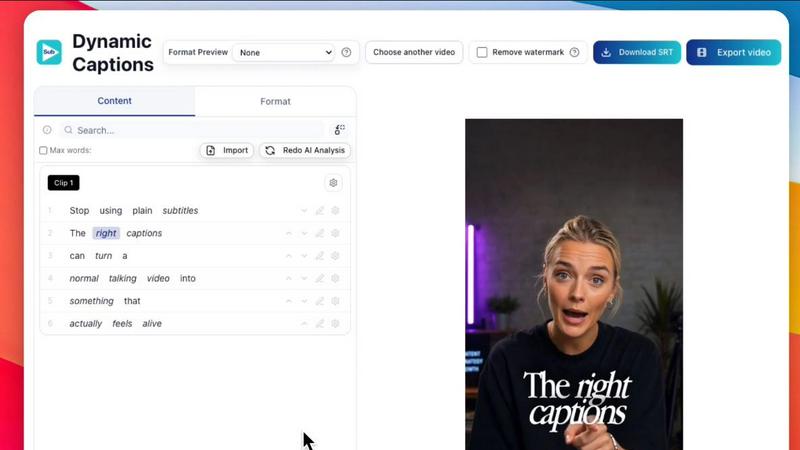
About Subclip
Subclip is an AI-powered video editor built for creators, marketers, and educators who need to produce high-quality video content without the steep learning curve of traditional editing software. The platform redefines video editing by allowing users to edit videos like a document, simply by dragging a transcript and making text-based changes. This approach eliminates the need for scrubbing through hours of raw footage on a timeline, reclaiming up to 80% of a creator's time. Subclip integrates a comprehensive suite of AI-driven tools including transcription, subtitle generation, voice cloning, silence and filler word removal, and multi-language dubbing. It is designed for YouTubers, podcasters, course creators, vloggers, coaches, agencies, and freelancers who need to increase output without increasing editing hours. The platform supports export to industry-standard non-linear editors (NLEs) like DaVinci Resolve, Final Cut Pro, and Adobe Premiere Pro via .fcpxml files, making it a seamless addition to any existing tech stack. Subclip also features built-in scheduling for platforms like YouTube and X (Twitter), with more social media integrations coming soon. Its AI clipping engine automatically identifies high-energy segments, punchlines, and emotional shifts to create short, high-retention clips from long-form content. With support for local transcription in 48+ languages and AI dubbing into 21+ languages while preserving original tone and background music, Subclip acts as a complete end-to-end video production and localization platform. The product operates entirely in the browser, eliminating upload and download wait times that plague other tools. Subclip is available under a freemium model with a free tier and affordable paid plans.
Features of Subclip
Text-Based Video Editing
Subclip allows you to edit videos by manipulating the transcript text, just like editing a document in Google Docs. You can trim mistakes, remove entire sections, or rearrange segments by cutting and pasting text. The timeline updates automatically, eliminating the need for manual rework. This feature supports exporting the edited timeline as an NLE project file (.fcpxml) for DaVinci Resolve, Final Cut Pro, and Adobe Premiere Pro, ensuring compatibility with professional post-production workflows.
AI Dubbing with Voice Cloning
Translate your video into 21+ languages while maintaining your original tone, emotion, and background music. Subclip uses AI to clone your voice, ensuring that the dubbed version sounds natural and authentic rather than robotic. This feature is ideal for creators looking to expand their global audience without re-recording voiceovers. The platform handles the entire dubbing process, from transcription to voice generation, all within a single browser-based workflow.
One-Click Captions and Subtitles
Generate unlimited subtitles for your videos with a single click. Subclip supports local transcription in 48+ languages, meaning your data stays secure and processing is fast. You can customize the text formatting and style before exporting. The captions are dynamic and can be added to clips of any aspect ratio, including 16:9, 9:16, and 1:1, making them ready for platforms like YouTube, TikTok, Instagram, and X.
AI Clipping and Silence Removal
Subclip’s AI engine automatically scans your long-form video for high-energy segments, punchlines, and key emotional shifts to identify the best moments for short clips. Each clip is assigned a viral score, engagement score, and retention score to help you prioritize. Additionally, the platform can remove silences and filler words with one click, cleaning up your audio and tightening the pacing of your video without manual effort.
Use Cases of Subclip
Content Creators and Podcasters
Creators and podcasters can use Subclip to turn long-form content into multiple short, high-retention clips for social media. The AI clipping engine identifies the most engaging moments, while the text-based editor allows for rapid trimming and rearrangement. One-click captioning and silence removal ensure the final product is polished and accessible, ready for scheduling directly to YouTube and X.
Course Creators and Coaches
Educators and coaches can dub their recorded courses or coaching sessions into 20+ languages using their own cloned voice. This allows them to reach a global audience without the expense and time of hiring voice actors. The text-based editing feature also makes it easy to correct mistakes or update sections of a training video by simply editing the transcript, rather than re-recording the entire segment.
Vloggers and Social Media Managers
Vloggers can streamline their entire workflow by using Subclip to add captions, insert B-roll, clean audio, and export in one click without limits. The platform’s support for multiple aspect ratios ensures content is optimized for every platform. Social media managers can schedule posts directly from the platform, saving time on manual uploads and cross-posting.
Agencies and Freelancers
Agencies and freelancers handling multiple client projects can increase output at a fraction of the cost. Subclip offers unlimited transcription and export, along with team collaboration features that allow sharing projects and collecting feedback in a single workspace. The ability to export edited clips as NLE project files ensures a smooth handoff to professional editors for final polish.
Frequently Asked Questions
How does Subclip’s text-based video editing work?
Subclip transcribes your video into text. You can then edit the transcript by deleting, cutting, or rearranging words and sentences. The corresponding video and audio on the timeline are automatically updated to match your text edits. This removes the need to manually scrub through footage and allows for rapid, precise edits. The final timeline can be exported as a .fcpxml file for use in DaVinci Resolve, Final Cut Pro, and Adobe Premiere Pro.
What languages does Subclip support for transcription and dubbing?
Subclip supports local transcription in 48+ languages, ensuring fast and secure processing. For AI dubbing with voice cloning, the platform supports 21+ languages. This includes major languages like English, Spanish, French, German, and many more. The AI preserves your original tone and emotion, and background music is maintained in the dubbed version.
Can I use Subclip with my existing video editing software?
Yes. Subclip is designed to integrate with professional NLE tools. You can export your edited timeline as a .fcpxml file, which is compatible with DaVinci Resolve, Final Cut Pro, and Adobe Premiere Pro. This allows you to use Subclip for the rapid editing and captioning phases, then move the project to your preferred editor for any advanced finishing work.
Is there a free version of Subclip?
Yes, Subclip operates on a freemium pricing model. There is a free tier that allows you to test the platform’s core features, including transcription, caption generation, and basic editing. For users who need more export minutes, unlimited captions, or access to advanced features like AI dubbing and team collaboration, affordable paid plans are available.
Similar to Subclip


Oravaa integrates with your tech stack to automate inbound support, outbound lead qualification, and operational calls with human-like Voice AI.

Hush Touch is an intelligent offline voice-to-text app for Mac that learns your vocabulary and processes dictation.

Glossa offers real-time AI translation of sermons into 100+ languages, bridging communication gaps effortlessly.

Bantr is an offline Mac app that offers unlimited, natural text-to-speech with complete privacy and no subscriptions.

KaiCalls is your 24/7 AI phone agent that captures leads and schedules appointments while providing instant customer.

Vowen is a voice-first productivity app that converts speech into text and actions for streamlined workflows across all.
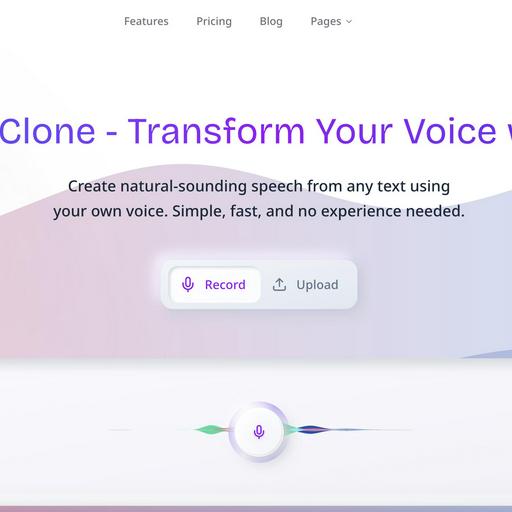
VoiceCloner seamlessly replicates voices to generate limitless speech content for diverse applications and integrations.