
TaleHug AI Story Generator for Kids
TaleHug transforms a child's voice, drawing, or idea into a customizable AI storybook for safe co-reading.
Visit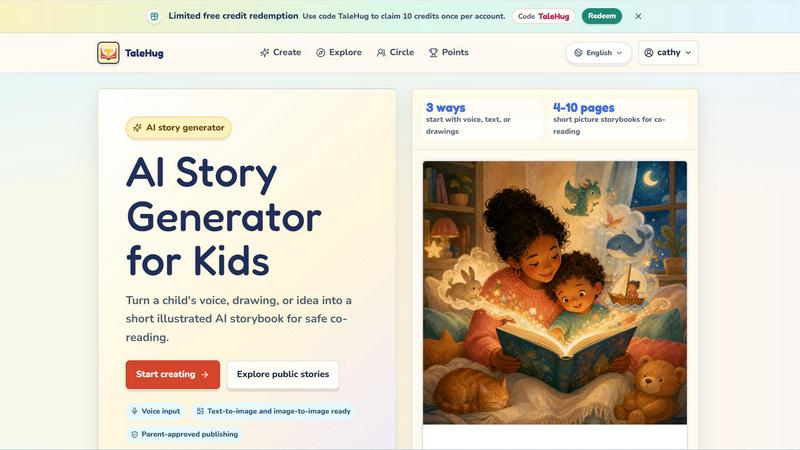
About TaleHug AI Story Generator for Kids
TaleHug is an AI-powered storytelling platform specifically engineered for children to create their own illustrated storybooks. The core architecture integrates voice input, text-to-image, and image-to-image generation models to transform a child's raw ideas, spoken words, or hand-drawn sketches into cohesive, picture-first narratives. The platform is built with a tech stack that prioritizes child-safe interaction, parent-approved publishing workflows, and minimal data exposure. TaleHug serves as a creative sandbox where young learners, typically aged 3-6, can generate 4-10 page short picture storybooks designed for co-reading with parents or teachers. The value proposition centers on removing technical barriers to storytelling: children can start with voice, text, or drawings, and the AI handles narrative generation, illustration creation, and page layout. The platform also enforces strict safety defaults, including private drafts by default, parent approval before any public or circle publishing, and the absence of public comments in the MVP. This makes TaleHug ideal for parents seeking a controlled creative environment, educators looking for kindergarten story prompts, and young children exploring storytelling without exposure to open social feeds. The system also supports customizable characters, themes, and visibility modes (private, circle, public), ensuring that creativity is balanced with safety and adult oversight.
Features of TaleHug AI Story Generator for Kids
Multi-Modal Input Pipeline
TaleHug accepts three distinct input methods: voice, text, and drawings. The voice input module captures a child's spoken idea and processes it through speech-to-text and natural language understanding to extract narrative elements. The drawing input uses image-to-image generation to transform a child's sketch into a polished illustration. Text input allows direct typing or selection from parent-approved prompts. This multi-modal architecture ensures that children with varying literacy levels can all participate in story creation.
AI-Powered Narrative and Illustration Generation
The core generation engine produces both text and visuals for each page of the storybook. Every page includes a strong, vibrant image generated via text-to-image models, a single short sentence suitable for early readers, and a stored prompt that allows for future regeneration or editing. The AI adapts the narrative based on the child's input, characters, and themes, ensuring each story is unique and personalized. The system is optimized for 4-10 page picture storybooks, balancing story length with attention spans.
Parent-Approved Publishing Workflow
TaleHug implements a multi-tier visibility system with safety at its core. All stories begin as private drafts. Publishing to a "Circle" (a curated group of family and friends) or to the public gallery requires explicit adult approval. The platform uses safe display names instead of full child names, prohibits public comments, and does not store school names, addresses, or contact details. This workflow ensures that children can share their creativity without exposure to open social dynamics.
Customizable Characters and Themes
Children can tailor characters, settings, and plots to match their interests. The AI supports a library of predefined themes such as bedtime stories, friendship adventures, and classroom social stories. Users can modify character appearances, choose color palettes, and select story arcs. This modular approach to story construction allows for repeated use without repetition, as each combination of character, theme, and input generates a unique output.
Use Cases of TaleHug AI Story Generator for Kids
Bedtime Story Creation for Co-Reading
Parents can use TaleHug to generate personalized bedtime stories based on their child's current interests or daily experiences. By speaking a simple idea like "a moon rabbit who is scared of the dark," the AI produces a 4-10 page illustrated storybook. The parent can then read the story aloud with the child, using the picture-first layout to engage early readers. This use case leverages the voice input and bedtime theme prompts to create a calming, interactive wind-down activity.
Kindergarten Classroom Story Prompts
Teachers can deploy TaleHug as a tool for social-emotional learning and literacy development. For example, a teacher might use the "First school morning" or "Garden courage" prompts to help children explore feelings about starting school or asking for help. Each child can create their own version of the story, fostering individual expression while the class discusses common themes. The private draft feature ensures that student work remains within the classroom ecosystem until shared with parental approval.
Speech and Language Development Activities
Speech therapists and language specialists can integrate TaleHug into therapy sessions. The voice input feature allows children with speech delays or articulation challenges to practice speaking in a low-pressure, creative context. The AI transcribes their spoken ideas into story text, providing immediate visual feedback. The resulting storybook can be used as a shared reading activity to reinforce vocabulary, sentence structure, and narrative sequencing in a motivating, child-friendly format.
Family Storytelling and Gift Creation
Extended family members can use TaleHug to create personalized storybooks as gifts for children. A grandparent might upload a drawing the child made during a visit, then use the image-to-image feature to turn it into a polished illustration for a story. The resulting picture storybook can be saved as a digital file or printed, creating a tangible keepsake that celebrates the child's creativity and the family connection. The "Circle" visibility mode allows sharing with multiple family members securely.
Frequently Asked Questions
How does TaleHug handle child safety and data privacy?
TaleHug enforces strict safety defaults. All stories are created as private drafts by default. Publishing to a Circle or the public gallery requires explicit adult approval. The platform uses safe display names instead of full child names, does not allow public comments in the MVP, and does not store school names, addresses, or contact details. The public gallery only displays approved examples from the TaleHug team. The platform uses essential cookies for operation and offers optional analytics cookies.
What input methods can a child use to start a story?
Children can start a story using three methods: voice, text, or drawings. Voice input captures spoken ideas and converts them to text via speech-to-text technology. Text input allows direct typing or selection from parent-approved prompts. Drawing input allows children to upload a sketch, which the AI then transforms into a polished illustration using image-to-image generation. All three methods feed into the same narrative and illustration generation pipeline.
How long are the generated storybooks?
TaleHug generates short picture storybooks ranging from 4 to 10 pages. Each page contains one strong, vibrant image and a single short sentence suitable for early readers. This format is designed for co-reading sessions with parents or teachers, typically lasting 5-10 minutes. The page count is optimized for the attention span of children aged 3-6, the platform's target age range.
Can I edit or regenerate a story after it is created?
Yes, each page of the generated storybook includes a stored prompt that allows for future regeneration or editing. This means you can adjust the illustration style, modify the text, or change the narrative direction after the initial generation. The platform is designed to support iterative creativity, allowing children and parents to refine stories until they are satisfied. Stories can also be saved as drafts and revisited later.
Pricing of TaleHug AI Story Generator for Kids
TaleHug operates on a credit-based system. New users can redeem a limited number of free credits. Use the code "TaleHug" to claim 10 credits once per account. Each credit likely corresponds to a single story generation or a set of pages. The platform does not publicly list full pricing tiers or subscription plans in the provided context. Users should check the platform for any additional credit packs or subscription options that may be available.
Similar to TaleHug AI Story Generator for Kids

A game show board for the TV, with real buzzers on every player's phone

Most likely to, would you rather and more: the TV shows it, every phone votes

Create a free live poll, share a QR code, and watch the votes come in live.

Master networking with interactive, hands-on practice directly in your browser. Solve real terminal challenges, debug routes, and build core IT skills


One API key and one credit balance for Reddit and X data. REST endpoints and a hosted MCP server, so your code and your agents call the same tools.

AI SEO agent that finds pages ranking for your keywords, pitches the people behind them from your inbox, and follows up. You approve every send.

AI social listening agent: finds people on Reddit and X describing your problem, scores buying intent and drafts a reply you approve.