
dmaya vs Refbox
Side-by-side comparison to help you choose the right product.

dmaya
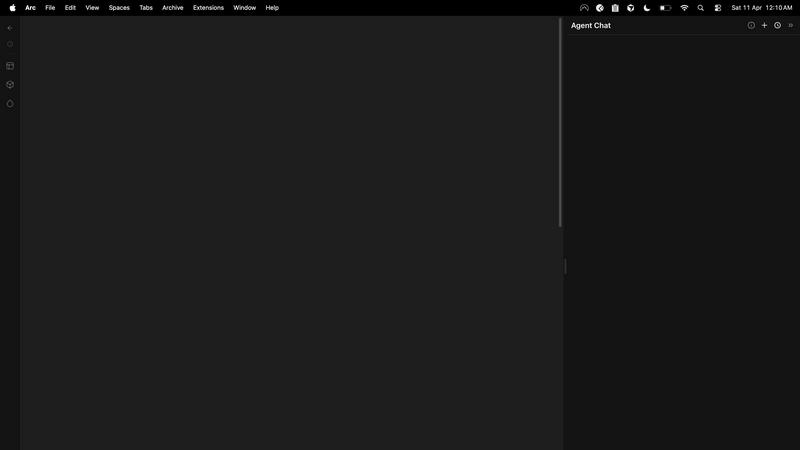
dMaya is the AI design platform for agencies that generates production-ready UI and exports to any code framework.
Last updated: April 13, 2026

Refbox
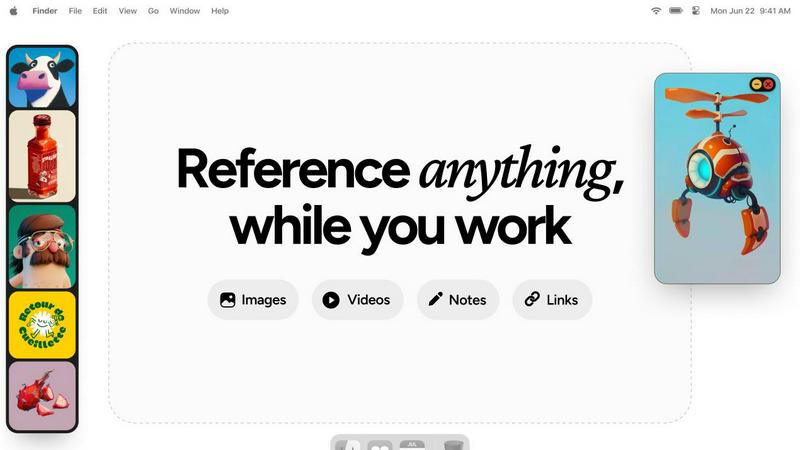
Refbox provides instant access to your images, videos, and notes, streamlining your workflow without distractions.
Last updated: February 28, 2026
Visual Comparison
dmaya
Refbox
Feature Comparison
dmaya
Conversational AI Design Agent
Interact with an intelligent AI agent using natural language to generate and modify designs. Describe a need like "a SaaS dashboard for analytics" or request precise changes such as "swap to a dark theme, increase padding, and use a sans-serif font." The AI interprets these commands in real-time, applying adjustments instantly across your project while maintaining design consistency through automatic token management, enabling rapid prototyping and refinement.
Multi-Screen, Multi-Device Canvas
Work on an expansive, infinite canvas that supports simultaneous design across multiple artboards for desktop, tablet, and mobile views. Organize and manage complete user flows, such as an e-commerce checkout or a multi-step onboarding process, in a single unified workspace. This feature mirrors the flexibility of traditional design tools but is supercharged with AI-assisted layout generation and responsive variant creation.
Client Presentation & Feedback Portal
Share any design via a secure, shareable preview link that requires no account for clients or stakeholders to view. They can interact with the prototype, leave contextual feedback directly on the design, and approve versions. This streamlines the review cycle from days to minutes, centralizing communication and iteration within the dmaya platform without the need for external meeting software or scattered email threads.
Framework-Agnostic Code Export
Export finalized and approved designs as production-ready, clean HTML, CSS, and JavaScript code. This output is meticulously structured and commented, making it the perfect input for AI coding assistants like Cursor, Claude Code, or GitHub Copilot. Hand off the exported code to your agent of choice to be transformed into components for your specific tech stack, whether it's React, Next.js, Flutter, or Vue.js.
Refbox
Floating Reference Frames
This feature allows users to keep their references visible while working across various applications. The resizable frames can be adjusted to fit any screen layout, ensuring that users can maintain focus without losing sight of their inspiration.
Masonry Mode
Masonry Mode presents references in a visually appealing grid layout, enabling users to see multiple images or media items at once. This mode is ideal for comparing ideas side by side, fostering creativity and quick decision-making.
Instant Collection Switching
Refbox provides the ability to create and manage multiple collections of references. Users can switch between these collections instantly with a click, allowing for seamless transitions based on different project requirements or creative directions.
Enhanced Note-Taking
With Refbox, users can take structured notes that include text styling options and checklists. This feature is perfect for jotting down ideas or reminders, ensuring that all relevant information is easily accessible alongside visual references.
Use Cases
dmaya
Agency Pitch & Concept Development
Agencies can dramatically accelerate their client acquisition process. During discovery calls or initial workshops, teams can use dmaya to generate live, visual concepts based on client descriptions. This allows for presenting multiple, polished design directions in hours instead of weeks, impressing stakeholders and winning more business by demonstrating immediate, tangible value and alignment.
Product Team Ideation & Prototyping
Product managers and designers can use dmaya to explore UI directions and validate ideas before committing engineering resources. They can quickly generate interactive prototypes for user testing, gather internal stakeholder feedback, and iterate on the visual design in real-time. This reduces risk, ensures product-market fit, and creates a single source of truth for the design before development sprints begin.
Freelancer Project Delivery
Freelancers and independent contractors can leverage dmaya to increase their project throughput and service offerings. By automating the initial design and iteration phases, they can take on more clients or deliver higher-fidelity work faster. The professional presentation tools and seamless client feedback loop enhance perceived value, allowing freelancers to command higher rates for efficient, tech-forward service delivery.
Design-to-Development Handoff
Bridge the gap between design and engineering teams. Once a design is approved in dmaya, developers receive exportable, clean code instead of static mockups or complex design files. This code can be directly utilized or fed into AI coding agents to build functional components, ensuring what was designed is what gets built with high fidelity, reducing misinterpretation and rework.
Refbox
Graphic Design
Graphic designers can use Refbox to pin various design inspirations, color palettes, and typography samples. This allows for quick access to essential references while working in design software, enhancing both creativity and efficiency.
Animation Projects
Animators can benefit from Refbox by keeping reference videos and GIFs in view during the animation process. This feature helps them maintain consistency in movement and style, leading to smoother animations and improved workflow.
UI/UX Design
Refbox serves UI/UX designers by providing a dedicated space for reference images, wireframes, and user feedback notes. This enables a streamlined design process, allowing designers to quickly adapt their work based on ongoing insights and inspirations.
Moodboarding and Concept Development
For artists and creative professionals involved in moodboarding or concept development, Refbox allows for effortless organization of visual references. Users can create moodboards that are always accessible, promoting a more cohesive and inspired creative process.
Overview
About dmaya
dmaya is an AI-powered design platform engineered for the modern development workflow, bridging the critical gap between conceptualization and code generation. It is purpose-built for agencies, product teams, and freelancers who operate on a design-first principle, where stakeholder alignment and visual approval are prerequisites to development. Unlike AI tools that bypass design to produce immediate code, dmaya provides a dedicated visual design environment. Here, users can generate complete, professional UI screens from simple text descriptions, iterate on them conversationally with an AI agent, and secure client sign-off—all before a single line of code is written. Its core value proposition lies in accelerating the entire front-end process: from initial brief to client-approved design and, finally, to exportable, clean code that integrates seamlessly with popular coding agents and frameworks like React, Next.js, and Flutter. By focusing on the intentional design phase, dmaya ensures teams can make critical decisions early, reduce costly rework, and ship with confidence.
About Refbox
Refbox is an innovative floating reference application tailored specifically for creative professionals who require constant access to their sources of inspiration. Designed for those engaged in activities such as sketching, designing, animating, and modeling, Refbox enables users to pin images, GIFs, videos, and notes in always-on-top frames that hover above their working applications. This feature eliminates the need for time-consuming window switching, leading to a more efficient and streamlined workflow. The application allows users to pull media from multiple sources, including the web, local storage, or the clipboard, presenting a customizable sidebar that adjusts to individual work styles. With unique features like Masonry Mode and a full-screen Gallery, Refbox caters to diverse display preferences, making it easy to organize and view references effectively. By enabling the creation of multiple collections, users can quickly switch between different sets of references based on their current project needs. Refbox is an invaluable tool for creative individuals looking to enhance productivity and maintain their creative flow, ensuring that inspiration is always at hand without unnecessary distractions.
Frequently Asked Questions
dmaya FAQ
What kind of code does dmaya export?
dmaya exports clean, semantic HTML, CSS, and vanilla JavaScript. This code is not tied to a specific framework, making it highly portable and an ideal starting point for any development environment. It is structured with clarity and best practices in mind, allowing AI coding agents (Cursor, Claude Code, etc.) or developers to easily convert it into components for React, Next.js, Flutter, or any other modern framework.
How does dmaya handle design consistency across screens?
dmaya uses a system of design tokens under the hood. When you make a change—like updating a primary color or font family—through the AI chat or direct editing, dmaya automatically propagates that change across all screens and components in the project. This ensures visual consistency at scale and eliminates the manual work of updating each screen individually.
Can clients interact with the designs I share?
Yes. When you share a preview link, clients and stakeholders can view the design in their browser. They can click through interactive elements if you've linked screens, and most importantly, they can leave pinned comments and feedback directly on specific parts of the design. All feedback is collected within your dmaya project for easy review and action.
Is dmaya a replacement for Figma or Sketch?
dmaya is built for a different phase of the workflow. It is not intended as a full replacement for granular, pixel-perfect vector editing tools. Instead, it excels at the early-stage conceptual design, rapid prototyping, and client presentation phase. Its strength is generating and iterating on high-fidelity UI concepts at the speed of thought, then facilitating approval and code export. It complements traditional tools by handling the heavy lifting of initial layout and styling.
Refbox FAQ
What operating systems does Refbox support?
Refbox is compatible with both Windows and macOS, ensuring that creative professionals can utilize the tool on their preferred platforms without compatibility issues.
Can I use Refbox with multiple monitors?
Yes, Refbox is designed to work seamlessly across multiple monitors. Users can pin reference frames on any screen, allowing for an expansive workspace that enhances productivity.
Is there a mobile version of Refbox?
Currently, Refbox is optimized for desktop use, focusing on providing a robust experience for creative professionals working on larger screens. A mobile version may be considered in future updates.
How does Refbox handle image and video formats?
Refbox supports a wide range of media formats, including common image formats (JPEG, PNG) and video formats (MP4, GIF). Users can easily add media from various sources, making it versatile for all types of creative work.
Alternatives
dmaya Alternatives
dMaya is an AI-powered vibe design platform that operates within the design-to-code tool category. It enables agencies and teams to generate, iterate, and approve visual UI designs through conversational AI before exporting clean, production-ready code. This workflow bridges the critical gap between conceptual design and technical implementation. Users may explore alternatives for several common reasons. These include budget constraints, specific feature requirements like advanced prototyping or native app integrations, or a need for tools that fit within a particular existing tech stack or design system. The search often centers on finding a solution that aligns with a team's unique operational and technical needs. When evaluating alternatives, key considerations should include the quality and control of AI-generated outputs, the efficiency of the client feedback and approval cycle, and the cleanliness and compatibility of the exported code with frameworks like React, Next.js, or Flutter. The ideal tool should integrate smoothly into your development pipeline, ensuring a seamless handoff from design to code.
Refbox Alternatives
Refbox is a cutting-edge floating reference application designed for creative professionals who require immediate access to their sources of inspiration while working. By allowing users to pin images, videos, and notes above their applications, it streamlines the creative process, making it easier to maintain focus without the hassle of constant window switching. Users often seek alternatives to Refbox for various reasons, including pricing limitations, feature sets that may not fully meet their needs, or compatibility with specific platforms. When searching for an alternative, it is essential to consider factors such as user interface, integration capabilities with existing tools, customization options, and overall ease of use to ensure that the new solution complements and enhances your workflow effectively.