
Fusedash vs Threat Watch
Side-by-side comparison to help you choose the right product.

Fusedash
Fusedash transforms raw data into interactive dashboards and charts, enabling teams to act on insights instantly.
Last updated: March 4, 2026

Threat Watch
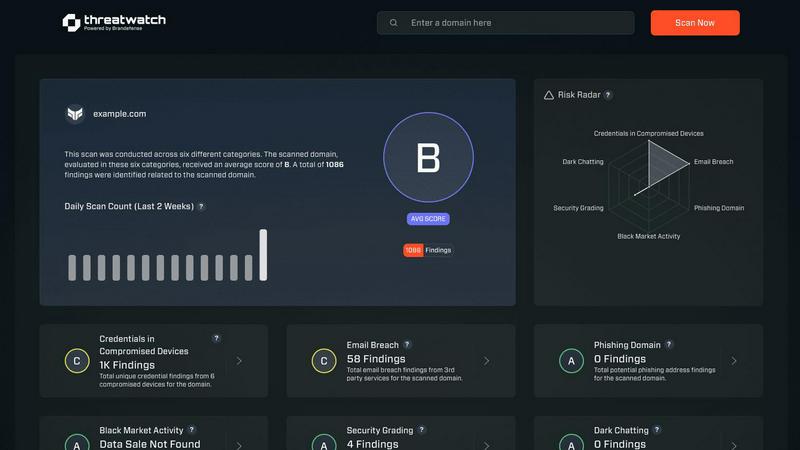
Threat Watch integrates with your tech stack to instantly scan for compromised credentials and dark web exposures.
Last updated: March 1, 2026
Visual Comparison
Fusedash

Threat Watch
Feature Comparison
Fusedash
Flexible Views
Fusedash enables users to create various visual representations of the same dataset, including dashboards, charts, maps, and report-style views. This flexibility ensures that different teams receive the precise insights they need without unnecessary back-and-forth communication, streamlining decision-making processes.
AI Chart Generator
The AI chart generator in Fusedash allows users to transform raw data from CSVs or APIs into clear and compelling visuals in mere minutes. It intelligently selects the best chart types and applies relevant comparisons and labels, making it easier for users to communicate their data stories effectively.
Dashboard Software
Fusedash's dashboard software is designed to provide comprehensive monitoring of KPIs while also offering contextual narrative reporting. This combination equips stakeholders with the necessary insights to understand changes, their implications, and recommended actions, thus reducing the risk of conflicting reports.
AI Chat Integration
The Smart Chat feature allows users to interact with their data using natural language queries, facilitating quicker insights. By asking questions in plain language, users can explore data breakdowns and receive suggestions for the most relevant metrics and visuals, which can then be instantly integrated into shareable dashboards.
Threat Watch
Compromised Credential Monitoring
This feature continuously scans underground forums, paste sites, and breach databases to identify corporate credentials that have been exposed. It correlates email domains and usernames against real-time leak intelligence, providing immediate alerts with the context of the breach source. Integration capabilities allow for automated ticket creation in ITSM tools and credential revocation workflows in Active Directory or Okta, enabling swift containment of account takeover threats.
Dark Web Content Analysis
Threat Watch deploys advanced crawlers and natural language processing to monitor dark web marketplaces, illicit Telegram channels, and hacker forums for mentions of your organization, key personnel, or critical assets. This goes beyond simple keyword matching to understand context and intent, providing early warnings of planned attacks, data dumps, or insider threats discussed in hidden corners of the internet.
Breached Account Detection
The platform actively identifies corporate accounts that have been compromised in third-party data breaches, even if the primary domain's systems are secure. It assesses the risk level based on the sensitivity of the breached service and the password reuse patterns, feeding this intelligence directly into your IAM (Identity and Access Management) system to trigger mandatory password resets or multi-factor authentication enforcement.
Automated Security Health Scoring
Threat Watch synthesizes data from all its monitoring vectors into a dynamic, quantifiable Cyber Health Score. This score is calculated based on the volume and severity of exposures across credentials, phishing addresses, and dark web presence. The scoring engine integrates with dashboard tools like Grafana or Power BI, providing a real-time KPI for executive reporting and compliance audits.
Use Cases
Fusedash
Executive Reporting
Fusedash is ideal for executives who need to monitor KPIs and performance metrics at a glance. With customizable dashboards and narrative reports, leaders can easily access critical insights, understand organizational health, and make informed strategic decisions.
Marketing Analytics
Marketing teams can leverage Fusedash to visualize campaign performance data, track conversion rates, and analyze customer segments. By utilizing interactive charts and real-time monitoring, marketers can quickly adapt strategies based on actionable insights derived from their data.
Operations Management
Operations teams can benefit from Fusedash by creating dashboards that track operational metrics, such as efficiency and productivity. The ability to drill down into specific segments or timeframes allows teams to identify bottlenecks and optimize processes effectively.
Data-Driven Storytelling
Organizations can use Fusedash to create data-driven narratives that convey important insights to stakeholders. By combining performance visuals with storytelling elements, teams can present complex data in an understandable format, fostering alignment and informed discussions.
Threat Watch
Proactive Threat Intelligence for SOC Teams
Security Operations Centers integrate Threat Watch's API feeds directly into their SIEM (e.g., Splunk, Elastic) and SOAR platforms. This enriches internal alerts with external threat context, allowing analysts to prioritize incidents where internal detection events correlate with known external exposures, dramatically reducing mean time to respond (MTTR) to active compromises.
IT Administrator Account Hygiene Enforcement
IT teams leverage the platform's compromised credential alerts to automate user account lifecycle management. By connecting Threat Watch to Microsoft Entra ID (Azure AD) or other directory services, they can automatically flag high-risk accounts for password resets or temporarily disable them pending review, enforcing a consistent security policy at scale.
Third-Party and Supply Chain Risk Assessment
Organizations use Threat Watch to monitor not only their own domains but also those of critical vendors and partners. By assessing the external cyber health of third parties, they can quantify supply chain risk, mandate specific security controls in contracts, and receive alerts if a partner's breach could impact their own environment.
Compliance and Audit Reporting
Compliance officers utilize the platform's historical data and health scoring to generate evidence for frameworks like ISO 27001, SOC 2, and NIST CSF. The automated reports demonstrate continuous monitoring of digital exposures, satisfying audit requirements for proactive threat management and risk assessment processes.
Overview
About Fusedash
Fusedash is an AI-powered data visualization platform tailored for teams seeking to convert their connected data into actionable insights with clarity and efficiency. It serves as a unified workspace where users can create a variety of decision-ready outputs, including dashboards, interactive charts, detailed maps, and comprehensive narrative reports. The platform eliminates the redundancy of rebuilding logic across multiple disconnected tools by enabling users to define key metrics and KPIs once and reuse them throughout their organization. This ensures that all stakeholders—from leadership to marketing and operations—are aligned and referencing the same reliable data. Fusedash is specifically designed for teams that are frustrated with manual reporting cycles and inconsistent data narratives. It not only allows users to monitor real-time data but also empowers them to understand causative factors by drilling down into specific segments, regions, or time periods. With integrated AI features like natural language data chat and smart visualization assistance, Fusedash significantly enhances the speed and accessibility of data exploration, transforming raw data into a shared source of truth that fosters organizational alignment and informed decision-making.
About Threat Watch
Threat Watch is a comprehensive cybersecurity intelligence and exposure management platform engineered for modern IT and security stacks. It provides organizations with a continuous, automated assessment of their external cyber health by analyzing digital assets, vulnerabilities, and exposures across the public internet and dark web. The platform is specifically designed for IT administrators, SOC teams, and compliance officers who need to integrate robust threat intelligence into their existing security workflows without operational overhead. Its core value proposition lies in its API-first architecture and real-time data correlation, which delivers prioritized, actionable insights. By seamlessly integrating with SIEM systems, SOAR platforms, and IT service management tools like Jira and ServiceNow, Threat Watch enables teams to automate the identification, validation, and remediation of risks, transforming raw data into enforceable security policy.
Frequently Asked Questions
Fusedash FAQ
What types of data sources can Fusedash connect to?
Fusedash can connect to a variety of data sources, including CSV files, APIs, and databases. This flexibility allows users to integrate diverse data sets into a single platform for comprehensive analysis.
How does Fusedash ensure data consistency across reports?
Fusedash promotes data consistency by allowing users to define key metrics and KPIs once, which can then be reused across all dashboards, charts, and reports. This standardization eliminates discrepancies and enhances trust in reported numbers.
Can I customize dashboards for different teams within my organization?
Yes, Fusedash allows users to customize dashboards to meet the specific needs of different teams. You can adjust layouts, filters, and time ranges to ensure that each team sees the most relevant data without duplicating effort.
Is there a trial version of Fusedash available?
Fusedash offers a demo request option on its website, allowing potential users to experience the platform's capabilities before committing to a subscription. This enables organizations to assess how Fusedash can meet their data visualization needs effectively.
Threat Watch FAQ
How does Threat Watch integrate with our existing security stack?
Threat Watch is built with a robust REST API and supports out-of-the-box integrations for leading SIEMs (Splunk, IBM QRadar), SOAR platforms, ITSM tools (ServiceNow, Jira), and cloud identity providers (Microsoft Entra ID, Okta). This allows for bidirectional data flow, enabling automated alert ingestion and remediation action execution without manual intervention.
What is the deployment model and does it require an agent?
Threat Watch is a cloud-native SaaS platform that requires no on-premise hardware or endpoint agents for its core exposure monitoring functions. Deployment involves API key configuration and domain registration, allowing you to gain visibility within minutes. This agentless approach minimizes IT overhead and scales effortlessly with your organization.
How does the platform ensure data privacy and security?
Threat Watch operates under a strict data processing agreement. It only monitors publicly available data and information from breach corpuses. For credential monitoring, it typically uses hashed identifiers (like email prefixes) to search databases without transmitting or storing full plaintext credentials. All data is encrypted in transit and at rest within a SOC 2 compliant infrastructure.
What kind of support and SLAs are offered with the service?
The platform offers tiered support levels aligned with enterprise needs, including 24/7 technical support for critical incident response. Service Level Agreements (SLAs) cover platform uptime, data feed freshness (often within minutes of discovery), and API response times, ensuring the intelligence provided is both reliable and actionable for time-sensitive security operations.
Alternatives
Fusedash Alternatives
Fusedash is an AI-powered data visualization platform that falls under the category of analytics and business intelligence. It enables teams to convert raw data into clear dashboards and charts, allowing for instant insights and informed decision-making. Users often seek alternatives to Fusedash for various reasons including pricing, specific feature requirements, integration capabilities, or platform compatibility that aligns better with their unique organizational needs. When choosing an alternative to Fusedash, it's essential to consider factors such as ease of use, the ability to create customizable dashboards, the integration with existing data sources, and the overall flexibility of the platform. Additionally, evaluating the support and resources available for users can significantly impact the effectiveness of a chosen solution.
Threat Watch Alternatives
Threat Watch is a cybersecurity intelligence and business intelligence platform designed to provide real-time insights into an organization's security posture. It focuses on actionable data like compromised credentials, dark web exposures, and vulnerability assessments to help teams prioritize and mitigate risks. Users often explore alternatives to find a solution that better aligns with their specific tech stack, budget, or feature requirements. Common drivers include the need for deeper integration with existing SIEM, SOAR, or IT service management tools, a different pricing model, or more specialized capabilities like advanced threat hunting or regulatory compliance reporting. When evaluating other platforms, key technical considerations should include API availability for custom integrations, compatibility with your current security ecosystem, the granularity of real-time data feeds, and the automation depth for response workflows. The ideal alternative should seamlessly connect to your existing infrastructure while filling any specific functional gaps.