
Gleem.AI Studio vs SimpleDraw
Side-by-side comparison to help you choose the right product.

Gleem.AI Studio
Gleem.AI Studio is a unified AI image workspace for generating and editing visuals effortlessly in one intuitive.
Last updated: February 27, 2026

SimpleDraw
Create precise floor plans and scale drawings effortlessly online with SimpleDraw’s user-friendly, free web tool.
Last updated: March 1, 2026
Visual Comparison
Gleem.AI Studio

SimpleDraw
Feature Comparison
Gleem.AI Studio
Text-to-Image Generator
Gleem.AI Studio features a powerful text-to-image generator that transforms your ideas into captivating visuals. By allowing users to choose their desired image size and set their artistic vision, this tool serves as the foundation for creating stunning graphics. The integrated Prompt Enhance feature refines user inputs, ensuring that the generated imagery meets professional standards.
AI Image Editing
With Gleem.AI Studio's AI image editing capabilities, users can perform complex edits in a straightforward manner. The intuitive editor allows for object addition and removal, pose adjustments, and application of various filters. This feature enables creators to restore old images or modify visual elements, all within a single cohesive environment, making the editing process more accessible and efficient.
AI Avatars
The AI Avatars feature allows users to generate and customize their own avatars, which can be integrated seamlessly into various scenes. This functionality provides the flexibility to adjust poses and experiment with different outfits without the need for a traditional photoshoot, making it perfect for personal branding and social media engagement.
Project Organization
Gleem.AI Studio facilitates effective project management by providing dedicated spaces for each idea. Users can save prompts, edits, and different versions of their work, ensuring that everything remains organized and easily accessible. This feature enhances collaboration among team members and promotes continuous development of creative projects.
SimpleDraw
Accurate Measurements & Scale Drawing
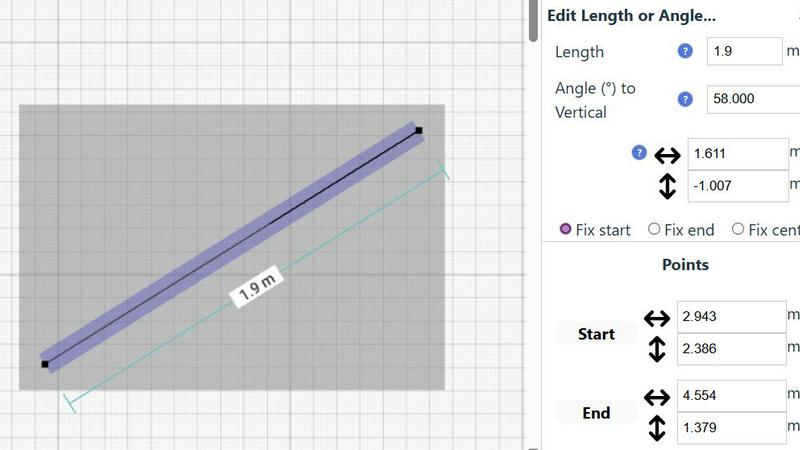
SimpleDraw offers precise measurements and smart alignment tools, ensuring that all drawings maintain accuracy and are to scale. This feature is crucial for users who demand precision in their designs, whether for personal projects or professional plans.
Specialized Floor Plan Creator
The dedicated Floor Plan Mode allows users to create detailed floor plans effortlessly. Users can draw walls, add windows and doors with a single click, and view real-time measurements as they adjust their designs, making it an invaluable tool for home renovations and space planning.
Smart Alignment System
This feature assists users in placing points and lines exactly where they need them. By using visual cues, SimpleDraw guides users to achieve precise placements, enhancing the overall drawing experience and reducing errors during the layout process.
Comprehensive Measurement System
SimpleDraw includes a comprehensive measurement system with customizable options for displaying measurements in either metric or standard US units. Contextual measurements appear dynamically as users work, allowing for precise adjustments and ensuring that the final output matches the user's expectations.
Use Cases
Gleem.AI Studio
Marketing Campaign Creation
Gleem.AI Studio is ideal for developing marketing campaigns, enabling users to generate eye-catching visuals for advertisements, social media posts, and promotional materials swiftly. The streamlined workflow allows for quick iterations and adjustments based on feedback, resulting in high-quality outputs that capture audience attention.
Social Media Content Generation
For social media managers and content creators, Gleem.AI Studio simplifies the process of creating engaging graphics and visuals. By leveraging the text-to-image generator and AI editing tools, users can produce a variety of posts that align with their brand identity, enhancing their online presence and engagement rates.
E-commerce Product Imagery
E-commerce businesses can benefit from Gleem.AI Studio by generating and editing product images that stand out. The ability to create consistent visuals quickly allows for better product representation online, ultimately leading to improved sales and customer satisfaction.
Personal Branding and Avatars
Individuals looking to enhance their personal brand can utilize the AI Avatars feature to create unique representations of themselves. These avatars can be customized for various contexts, from social media profiles to professional presentations, providing a versatile tool for personal engagement and visibility.
SimpleDraw
Kitchen & Bathroom Floor Plans
Users can plan renovations for kitchens and bathrooms with accurate measurements, visualizing layouts before starting any physical work. This helps in making informed decisions about design and functionality.
Room Layouts & Furniture Planning
Designing layouts for bedrooms, living rooms, or offices is made simple with SimpleDraw. Users can visualize whether furniture will fit in their desired spaces before making purchases, streamlining the planning process.
House & Apartment Plans
Create comprehensive floor plans for home projects, ideal for both personal use and rental listings. SimpleDraw's tools enable users to design every aspect of their living spaces, from room dimensions to furnishings.
Community-Driven Development
Engage with the SimpleDraw community to influence future features and improvements. This collaborative approach ensures the tool evolves based on real user feedback, making it more responsive to the needs of its users.
Overview
About Gleem.AI Studio
Gleem.AI Studio is an innovative unified AI image workspace designed specifically for creators who prioritize artistic expression over technical complexity. This platform effectively eliminates the need for juggling multiple disparate tools for image generation, editing, and revisions. With everything consolidated into a single, intuitive workflow, users can easily transition from one task to another without losing their creative momentum. Gleem.AI Studio is tailored for marketers, content creators, and small teams who require consistent and high-quality visuals quickly and efficiently. By removing unnecessary technical barriers, the platform allows users to focus on their creative ideas, facilitating rapid iteration and refinement. Whether you are designing marketing materials, crafting social media visuals, or generating product images, Gleem.AI Studio simplifies the process, enabling a fast and seamless creative journey.
About SimpleDraw
SimpleDraw is an innovative, free online platform designed to empower users in creating precise and accurate scale drawings. Whether you're a casual user, a DIY enthusiast, or a professional architect, SimpleDraw caters to your drawing needs with its intuitive interface and specialized tools. The platform allows you to craft detailed floor plans, elevations, and other technical drawings without the necessity of extensive training or prior software experience. Its primary value proposition lies in the seamless blend of simplicity and efficiency, enabling users to realize their creative visions with just a few clicks. With no sign-up or software installation required, you can start drawing immediately in your web browser. This focus on ease of use, combined with a robust set of features, positions SimpleDraw as the ideal choice for anyone looking to create accurate scale drawings quickly and effectively.
Frequently Asked Questions
Gleem.AI Studio FAQ
What is Gleem.AI Studio?
Gleem.AI Studio is an AI-driven image workspace that combines image generation and editing in one platform, designed to streamline the creative process for marketers and creators.
How does the text-to-image generator work?
The text-to-image generator allows users to input their ideas in natural language, which are then transformed into visuals. The Prompt Enhance feature refines these inputs for optimal results.
Can I edit images after generating them?
Yes, Gleem.AI Studio provides robust AI image editing tools that enable users to make adjustments to their generated images without leaving the platform, ensuring a seamless workflow.
Is there a way to organize my projects in Gleem.AI Studio?
Absolutely. Gleem.AI Studio allows users to create dedicated spaces for each project, making it easy to manage saved prompts, edits, and versions, enhancing organization and collaboration.
SimpleDraw FAQ
Is SimpleDraw really free to use?
Yes, SimpleDraw is a completely free online tool that requires no sign-up or software installation, allowing users to start drawing immediately.
What types of drawings can I create with SimpleDraw?
You can create a variety of drawings including floor plans, room layouts, elevations, and architectural designs tailored to your specific needs and projects.
Do I need any prior experience to use SimpleDraw?
No, SimpleDraw is designed for users of all skill levels. Its intuitive interface allows beginners to create detailed drawings without the need for extensive training or prior software experience.
Can I collaborate with others using SimpleDraw?
While SimpleDraw currently focuses on individual use, users are encouraged to join the community and share feedback, which can help inform future collaborative features and enhancements.
Alternatives
Gleem.AI Studio Alternatives
Gleem.AI Studio is an innovative all-in-one AI image workspace tailored for marketers, creators, and small teams seeking to streamline their visual content creation process. By integrating image generation and editing into a single platform, it eliminates the need for complex setups and switching between tools, allowing users to focus on their creative output. Users often look for alternatives to Gleem.AI Studio for various reasons, including pricing, feature sets, or specific platform needs that their projects may require. When choosing an alternative, consider factors such as ease of use, integration capabilities with existing workflows, and the range of features offered to ensure it meets your creative demands effectively.
SimpleDraw Alternatives
SimpleDraw is a free, web-based tool designed for creating precise and accurate scale drawings, which places it firmly in the realm of design tools. Its user-friendly interface caters to a wide audience, from casual users to professional designers seeking to draft detailed floor plans and technical drawings without extensive training. As users increasingly seek alternatives, reasons often include the desire for enhanced features, different pricing structures, or specific platform compatibility that better suits their needs. When searching for an alternative to SimpleDraw, users should consider the essential features that align with their project requirements. Key factors to evaluate include the accuracy of scale drawings, the availability of specialized modes like floor plan creation, and the robustness of editing capabilities. Additionally, the ease of use and integration with existing workflows or software platforms can significantly influence the decision-making process in selecting the right tool for their design needs.