
Gleem.AI Studio vs Image3D AI
Side-by-side comparison to help you choose the right product.

Gleem.AI Studio
Gleem.AI Studio is a unified AI image workspace for generating and editing visuals effortlessly in one intuitive.
Last updated: February 27, 2026

Image3D AI
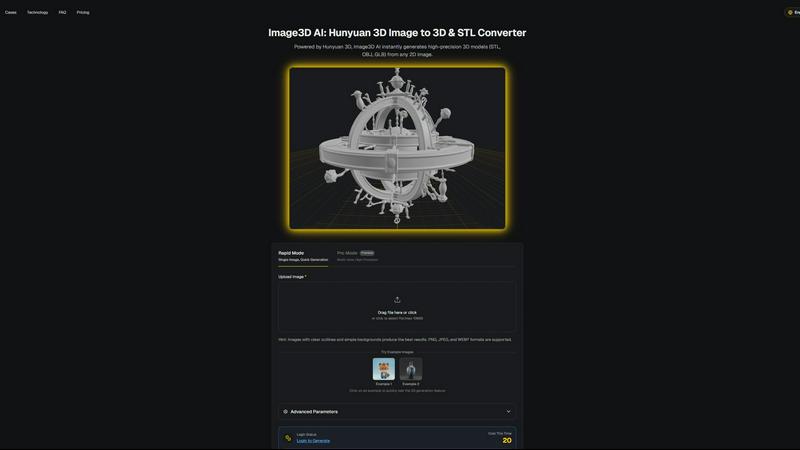
Image3D AI instantly converts 2D images into production-ready 3D models for printing and game engines.
Last updated: March 1, 2026
Visual Comparison
Gleem.AI Studio

Image3D AI
Feature Comparison
Gleem.AI Studio
Text-to-Image Generator
Gleem.AI Studio features a powerful text-to-image generator that transforms your ideas into captivating visuals. By allowing users to choose their desired image size and set their artistic vision, this tool serves as the foundation for creating stunning graphics. The integrated Prompt Enhance feature refines user inputs, ensuring that the generated imagery meets professional standards.
AI Image Editing
With Gleem.AI Studio's AI image editing capabilities, users can perform complex edits in a straightforward manner. The intuitive editor allows for object addition and removal, pose adjustments, and application of various filters. This feature enables creators to restore old images or modify visual elements, all within a single cohesive environment, making the editing process more accessible and efficient.
AI Avatars
The AI Avatars feature allows users to generate and customize their own avatars, which can be integrated seamlessly into various scenes. This functionality provides the flexibility to adjust poses and experiment with different outfits without the need for a traditional photoshoot, making it perfect for personal branding and social media engagement.
Project Organization
Gleem.AI Studio facilitates effective project management by providing dedicated spaces for each idea. Users can save prompts, edits, and different versions of their work, ensuring that everything remains organized and easily accessible. This feature enhances collaboration among team members and promotes continuous development of creative projects.
Image3D AI
Hunyuan 3D Engine Integration
At the core of Image3D AI is its integration with Tencent's Hunyuan 3D engine, a cutting-edge AI model specifically trained for 3D reconstruction. This technology enables the platform to perform sophisticated depth estimation and geometry inference from a single 2D image, generating detailed, high-precision 3D models. This backend engine is what allows for the rapid, sub-60-second conversion times and the production of models with clean topology suitable for professional applications, setting it apart from basic conversion tools.
Multi-Format Export for Seamless Integration
Image3D AI is engineered for compatibility, offering export in industry-standard 3D file formats including STL, OBJ, and GLB. This ensures generated models can be directly imported into downstream software stacks without conversion hassles. STL files are optimized for 3D printing slicers, OBJ files are universally compatible with 3D editing suites like Blender and Maya, and GLB files are the modern standard for web-based viewing, AR applications, and game engines like Unity and Unreal Engine.
Dual Generation Modes (Rapid & Pro)
The platform provides two distinct operational modes to match project requirements and resource constraints. Rapid Mode is designed for speed and simplicity, generating a 3D model from a single image quickly. Pro Mode utilizes multi-view input for a physically accurate reconstruction, delivering higher precision and detail for complex objects. This flexibility allows users to optimize the balance between generation speed and model fidelity based on their specific use case.
PBR Material Support
For game development and realistic rendering workflows, Image3D AI supports Physically Based Rendering (PBR) materials. When generating models, the AI can infer and apply realistic material properties, resulting in assets that are visually accurate and ready for real-time rendering in modern game engines. This feature eliminates the need for manual material setup, further accelerating the asset creation pipeline for developers and digital artists.
Use Cases
Gleem.AI Studio
Marketing Campaign Creation
Gleem.AI Studio is ideal for developing marketing campaigns, enabling users to generate eye-catching visuals for advertisements, social media posts, and promotional materials swiftly. The streamlined workflow allows for quick iterations and adjustments based on feedback, resulting in high-quality outputs that capture audience attention.
Social Media Content Generation
For social media managers and content creators, Gleem.AI Studio simplifies the process of creating engaging graphics and visuals. By leveraging the text-to-image generator and AI editing tools, users can produce a variety of posts that align with their brand identity, enhancing their online presence and engagement rates.
E-commerce Product Imagery
E-commerce businesses can benefit from Gleem.AI Studio by generating and editing product images that stand out. The ability to create consistent visuals quickly allows for better product representation online, ultimately leading to improved sales and customer satisfaction.
Personal Branding and Avatars
Individuals looking to enhance their personal brand can utilize the AI Avatars feature to create unique representations of themselves. These avatars can be customized for various contexts, from social media profiles to professional presentations, providing a versatile tool for personal engagement and visibility.
Image3D AI
Game Development & Rapid Prototyping
Game developers can use Image3D AI to rapidly generate 3D assets from concept art or reference images, drastically speeding up the prototyping phase. The tool's ability to produce models with PBR material support means these assets can be directly imported into engines like Unity or Unreal Engine for immediate testing and iteration, streamlining the pre-production workflow and enabling faster creative validation.
3D Printing & Maker Projects
For 3D printing enthusiasts and professionals, Image3D AI acts as a powerful image-to-STL converter. It transforms logos, sketches, or product photos into watertight, print-ready 3D meshes. The platform's focus on generating clean geometry ensures the resulting STL files are optimized for slicing software, reducing the need for manual repair and preparation before sending a model to the printer.
E-commerce & AR Product Visualization
E-commerce businesses can leverage Image3D AI to convert standard 2D product photos into interactive 3D models. These models can be embedded on product pages for 360-degree viewing or used in Augmented Reality (AR) applications to allow customers to visualize products in their own space. This enhances online shopping experiences, reduces return rates, and provides a significant competitive advantage.
Architectural Visualization & Design
Architects and designers can quickly generate basic 3D massing models or detailed site elements from sketches, floor plans, or inspiration images. This capability saves considerable modeling time from scratch, allowing for faster client presentations, early-stage design exploration, and efficient integration of concept models into more detailed BIM or CAD software workflows.
Overview
About Gleem.AI Studio
Gleem.AI Studio is an innovative unified AI image workspace designed specifically for creators who prioritize artistic expression over technical complexity. This platform effectively eliminates the need for juggling multiple disparate tools for image generation, editing, and revisions. With everything consolidated into a single, intuitive workflow, users can easily transition from one task to another without losing their creative momentum. Gleem.AI Studio is tailored for marketers, content creators, and small teams who require consistent and high-quality visuals quickly and efficiently. By removing unnecessary technical barriers, the platform allows users to focus on their creative ideas, facilitating rapid iteration and refinement. Whether you are designing marketing materials, crafting social media visuals, or generating product images, Gleem.AI Studio simplifies the process, enabling a fast and seamless creative journey.
About Image3D AI
Image3D AI is a professional-grade platform that revolutionizes the 3D asset creation pipeline by converting static 2D images into production-ready 3D models in seconds. Powered by Tencent's advanced Hunyuan 3D engine, it performs complex technical inference to generate high-precision 3D geometry and textures from a single input image. This AI-powered tool fundamentally democratizes high-fidelity 3D generation, making it accessible to professionals and enthusiasts without requiring deep expertise in traditional 3D modeling software like Blender or Maya. Its core value proposition lies in its seamless integration into diverse, tech-heavy workflows, offering multi-format export capabilities that ensure immediate compatibility with industry-standard tools. Whether for rapid prototyping in game development, creating watertight meshes for 3D printing, generating assets for AR/VR experiences, or building interactive 3D models for e-commerce, Image3D AI bridges the gap between 2D concepts and 3D reality with unprecedented speed, precision, and workflow efficiency.
Frequently Asked Questions
Gleem.AI Studio FAQ
What is Gleem.AI Studio?
Gleem.AI Studio is an AI-driven image workspace that combines image generation and editing in one platform, designed to streamline the creative process for marketers and creators.
How does the text-to-image generator work?
The text-to-image generator allows users to input their ideas in natural language, which are then transformed into visuals. The Prompt Enhance feature refines these inputs for optimal results.
Can I edit images after generating them?
Yes, Gleem.AI Studio provides robust AI image editing tools that enable users to make adjustments to their generated images without leaving the platform, ensuring a seamless workflow.
Is there a way to organize my projects in Gleem.AI Studio?
Absolutely. Gleem.AI Studio allows users to create dedicated spaces for each project, making it easy to manage saved prompts, edits, and versions, enhancing organization and collaboration.
Image3D AI FAQ
What image formats are supported for conversion?
Image3D AI supports common raster image formats including PNG, JPEG, and WEBP. For optimal results, uploaded images should be under 10MB in size. The platform works best with high-contrast images that have clear subject outlines and simple, uncluttered backgrounds to aid the AI in accurate geometry inference.
What is the difference between Rapid Mode and Pro Mode?
Rapid Mode is designed for speed, generating a 3D model from a single input image in about 60 seconds. It's ideal for logos, sketches, or simple objects. Pro Mode requires multiple views (e.g., front, side, back) of an object to perform a more accurate, physically-based 3D reconstruction. This mode yields higher precision and detail, making it suitable for converting complex real-world objects like shoes or consumer products.
Which 3D file format should I download?
The choice depends on your downstream application. Download the STL format for 3D printing, as it is the standard mesh format for slicer software. Choose OBJ for further editing in traditional 3D software like Blender, Maya, or 3ds Max, as it supports textures and is widely compatible. Select GLB for web display, AR experiences, or game engines, as it is a compact, single-file format that contains the model, textures, and material data.
How can I improve the quality of my generated 3D model?
To maximize conversion quality, start with a high-quality source image that has good lighting, clear edges, and a simple background. For object reconstruction, using Pro Mode with multiple, consistent views will yield the most accurate result. Understanding the tool's parameters, such as selecting the "Geometry" mode for 3D printing (which focuses on mesh integrity over textures), can also tailor the output to your specific workflow needs.
Alternatives
Gleem.AI Studio Alternatives
Gleem.AI Studio is an innovative all-in-one AI image workspace tailored for marketers, creators, and small teams seeking to streamline their visual content creation process. By integrating image generation and editing into a single platform, it eliminates the need for complex setups and switching between tools, allowing users to focus on their creative output. Users often look for alternatives to Gleem.AI Studio for various reasons, including pricing, feature sets, or specific platform needs that their projects may require. When choosing an alternative, consider factors such as ease of use, integration capabilities with existing workflows, and the range of features offered to ensure it meets your creative demands effectively.
Image3D AI Alternatives
Image3D AI is a professional-grade 3D generation platform that automates the conversion of 2D images into production-ready 3D models. It falls within the design tools category, specifically targeting workflows for 3D printing, game development, and digital content creation. Its core appeal is streamlining a traditionally complex technical process into a fast, accessible service. Users often explore alternatives for various technical and operational reasons. These can include specific budget constraints, the need for different feature sets like animation or texture painting, or requirements for integration with a particular software stack or platform. Evaluating the total cost of ownership and output quality for one's specific use case is crucial. When assessing an alternative solution, key technical considerations should guide the decision. Prioritize the engine's reconstruction accuracy, the range of supported export formats for your pipeline, and the tool's ability to generate clean, manifold meshes suitable for your end application, be it real-time rendering or additive manufacturing.