
Looktara vs poseup
Side-by-side comparison to help you choose the right product.

Looktara
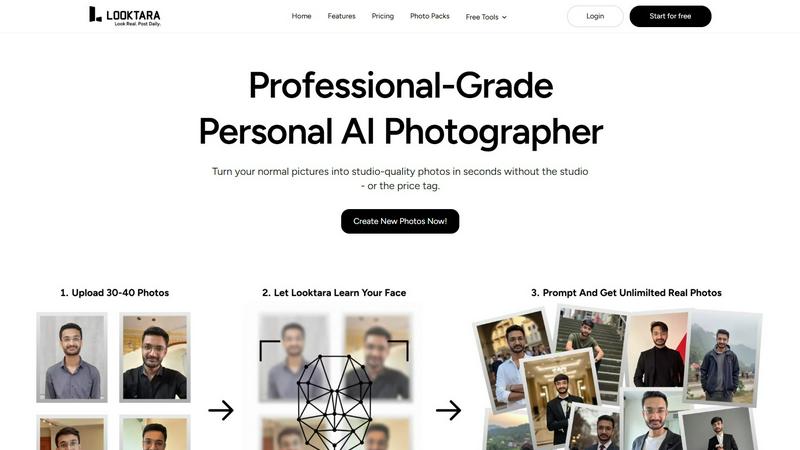
Looktara delivers personalized, high-quality AI photos that enhance your professional image with style and authenticity.
Last updated: February 28, 2026

poseup
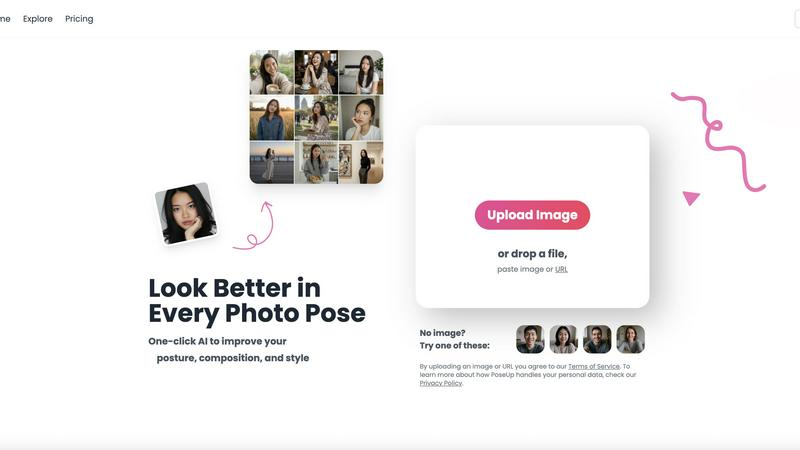
PoseUp's AI API instantly enhances photo poses and corrects posture for professional results.
Last updated: February 28, 2026
Visual Comparison
Looktara
poseup
Feature Comparison
Looktara
Instant Photo Generation
Looktara enables users to generate high-quality images in approximately 5 seconds after the initial model is created. This instant photo generation ensures that you can access professional-grade visuals whenever you need them, facilitating quick decision-making and content creation.
Personalized AI Models
Upon uploading a photo, Looktara constructs a private, encrypted AI model that captures your unique characteristics. This tailored approach ensures that each image embodies your individual essence and style, making your visuals stand out in a crowded digital landscape.
Versatile Contextual Styling
Looktara excels in providing contextually relevant images tailored to specific platforms and messages. Whether you require a formal portrait for LinkedIn or a casual shot for Instagram, Looktara offers styling that aligns perfectly with your personal brand and the intended audience.
Advanced Customization Options
Unlike typical AI-generated images, Looktara provides users with the ability to customize and refine their photos. You have control over elements such as background selection, lighting, and overall styling, allowing for a more personalized and polished final product.
poseup
One-Click AI Pose Enhancement
PoseUp's flagship feature is its one-click AI enhancement engine. This sophisticated system automatically analyzes uploaded photos to detect human subjects, then intelligently adjusts poses, corrects posture, and optimizes overall composition. The process requires no manual input or editing skills, leveraging a powerful backend to deliver professional-grade results instantly. It supports a wide range of standard image formats, ensuring compatibility with most digital photography workflows and devices.
Automated Posture & Composition Correction
The platform utilizes advanced computer vision algorithms to perform detailed posture and compositional analysis. It identifies suboptimal body alignment, slouching, or awkward angles and makes precise adjustments to create a more confident and aesthetically pleasing stance. Simultaneously, it evaluates the rule of thirds, subject placement, and background elements to recompose the frame for maximum visual impact and balance, elevating the overall quality of the photograph.
Multi-Scene Style Optimization
PoseUp's AI is trained to understand and enhance photos across diverse contexts and genres. Whether the input is a casual lifestyle shot, an outdoor adventure photo, a professional headshot, or a fitness image, the engine applies context-aware enhancements. This ensures that the pose corrections and stylistic adjustments are appropriate for the scene, maintaining authenticity while improving the subject's presentation and the photo's professional appeal.
Seamless Format & Workflow Integration
Built with integration in mind, PoseUp supports a comprehensive suite of standard image formats including JPG, PNG, WEBP, and HEIC, accommodating images from smartphones, DSLRs, and web sources. The platform is designed for a frictionless user experience, allowing quick upload via drag-and-drop, paste, or URL. This focus on compatibility and ease-of-use makes it a versatile tool that fits effortlessly into content creation, social media, and professional photography pipelines.
Use Cases
Looktara
Professional Networking
For professionals looking to enhance their online presence, Looktara provides high-quality, tailored images that can be used for LinkedIn profiles, ensuring that your visual identity aligns with your career goals and industry standards.
Social Media Branding
Looktara allows users to create visually striking images for platforms like Instagram and Twitter. The ability to customize photos ensures that your social media presence is vibrant, engaging, and reflective of your brand personality.
Marketing and Promotions
Businesses can utilize Looktara to generate promotional images that resonate with target audiences. With the right styling and context, these visuals can help in marketing campaigns, boosting engagement and conversion rates.
Personal Projects and Content Creation
Whether you're a blogger or content creator, Looktara makes it easy to produce high-quality images for articles, videos, or personal projects. The quick turnaround time means you can focus on your content without worrying about sourcing or creating images.
poseup
Social Media Content Creation
For influencers, bloggers, and everyday social media users, PoseUp is an indispensable tool for curating a perfect feed. It automatically enhances selfies and portrait shots by correcting posture and improving composition, ensuring every photo posted projects confidence and style. This saves hours of manual editing and helps maintain a consistent, high-quality aesthetic across platforms like Instagram, TikTok, and LinkedIn.
Professional Portrait Photography
Photographers can use PoseUp to streamline their post-production workflow. Instead of manually correcting minor pose imperfections in each shot, they can batch-process selects through the AI. This provides clients with flawlessly composed proofs faster, reduces editing time significantly, and allows photographers to focus more on creative direction and client interaction rather than tedious retouching tasks.
Business & Professional Branding
Professionals and businesses needing polished headshots for websites, company profiles, or marketing materials can leverage PoseUp to ensure a consistent and authoritative image. The AI corrects posture to convey confidence and optimizes composition for a corporate look, eliminating the cost and time associated with professional reshoots. This is ideal for remote teams or individuals creating their own branding assets.
Personal Photo Album Enhancement
Individuals looking to improve personal or family photos can use PoseUp to revitalize their memories. The tool can correct awkward group poses, align posture in vacation photos, and enhance composition in candid shots, transforming everyday snapshots into frame-worthy portraits. It's particularly useful for preparing photos for digital albums, prints, or special occasions without needing advanced photo editing knowledge.
Overview
About Looktara
Looktara is your personal AI photographer, designed to revolutionize the way you create and manage your visual identity. By leveraging advanced AI technology, Looktara delivers high-quality, personalized images that accurately represent you and your brand. The process is intuitive: simply upload a photo, and within 10 minutes, Looktara generates a private, encrypted model that captures your unique essence. Unlike traditional photography, Looktara offers studio-grade solo photos in just about 5 seconds, ensuring that you have stunning visuals ready whenever you need them. This tool caters to professionals across various industries, providing images that reflect the specific tone and context of your message, whether you need authoritative visuals for a LinkedIn profile, warmth for client stories, or a relaxed vibe for behind-the-scenes insights. With Looktara, experience the perfect balance of technology and creativity, designed to enhance your personal brand without the pitfalls of typical AI-generated images.
About poseup
PoseUp is an advanced, AI-powered photo enhancement platform engineered to transform both amateur and professional photography through automated pose, posture, and composition correction. At its core is a sophisticated AI engine that performs deep analysis on uploaded images to intelligently adjust human subjects. It fixes suboptimal stances, aligns body posture, and recomposes the frame for maximum visual impact, all with a single click. The platform is built for seamless integration into modern digital workflows, supporting standard image formats including JPG, PNG, WEBP, and HEIC. It serves a broad user base, from social media creators and influencers seeking perfect selfies to professional photographers and businesses needing polished portrait shots without extensive manual post-production. Its primary value proposition lies in its powerful backend technology coupled with technical simplicity, delivering professional-grade photo optimization that eliminates the dependency on manual editing skills or complex software suites like Photoshop. With accessible entry via free credits, PoseUp makes advanced AI photo correction a universally available tool for enhancing visual content across various scenes, from casual lifestyle and outdoor adventures to professional headshots.
Frequently Asked Questions
Looktara FAQ
How does Looktara ensure image quality?
Looktara uses advanced AI algorithms to generate images that replicate high-quality photography standards, ensuring professional-grade results tailored to your specifications.
Is my personal data safe with Looktara?
Yes, Looktara employs state-of-the-art encryption methods to protect your uploaded photos and generated models, ensuring that your data remains secure and private throughout the process.
Can I use Looktara for multiple social media platforms?
Absolutely! Looktara is designed to create images tailored to various platforms, allowing you to have a consistent yet contextually appropriate visual presence across all your social channels.
What if I don’t like my generated images?
Looktara provides advanced customization options, enabling you to refine your photos. If you're still unsatisfied, you can regenerate your images until you find the perfect fit for your needs.
poseup FAQ
What image formats does PoseUp support?
PoseUp is engineered for broad compatibility and supports all major image formats used in digital photography and web content. This includes JPG, PNG, WEBP, and HEIC files. This ensures you can upload images directly from your smartphone, digital camera, or downloaded from the web without needing to convert them first, facilitating a smooth integration into your existing workflow.
How does the AI pose correction technology work?
The technology is based on advanced computer vision and deep learning models. When you upload an image, the AI engine first detects human subjects and their key body points. It then analyzes the pose, posture, and composition against a trained dataset of aesthetically optimal stances. The system makes intelligent, pixel-level adjustments to align the subject's posture, improve bodily proportions, and recompose the frame according to photographic best practices, all automatically.
Is there a free trial or any free usage available?
Yes, PoseUp offers accessible entry to its platform through free credits. New users can get started and experience the core AI enhancement features without an initial payment. This allows you to test the technology's effectiveness with your own photos and understand its integration potential into your personal or professional content creation process before committing to a paid plan.
What is the maximum image size or resolution PoseUp can process?
Based on the provided information, PoseUp currently supports images up to 5MB in size. This constraint is in place to ensure fast processing times and stable performance across the platform. For best results, it is recommended to use high-quality images that are under this size limit, which typically accommodates resolutions well-suited for web and social media use.
Alternatives
Looktara Alternatives
Looktara is an innovative tool in the generative art category, specializing in creating personalized, high-quality AI photos that reflect an individual's unique style and professional image. Users often seek alternatives to Looktara due to factors such as pricing, specific feature sets, or compatibility with their existing technological ecosystems. When evaluating alternatives, it is essential to look for features like customization options, the quality of image outputs, the speed of generation, and overall user experience to ensure that the chosen platform meets your specific needs.
poseup Alternatives
PoseUp is an AI-powered API and platform within the image and photo enhancement category, specializing in automated pose correction and posture alignment. It transforms amateur shots into professional-grade portraits by intelligently analyzing and adjusting human subjects, serving a broad user base from social media creators to professional photographers. Users often explore alternatives to solutions like PoseUp for various technical and operational reasons. Common drivers include specific pricing model requirements, the need for different feature sets such as batch processing or unique stylistic filters, and compatibility with existing tech stacks or development environments. Integration ease, API rate limits, and support for particular programming languages or frameworks are also key decision factors. When evaluating an alternative, prioritize the technical specifications. Assess the underlying AI model's accuracy for your use case, the robustness and latency of the API, and the clarity of its documentation. Ensure it supports your required image formats and offers seamless integration into your current development workflow, whether through SDKs, webhooks, or direct REST API calls.