
TinyFast vs voicebrief.io
Side-by-side comparison to help you choose the right product.

TinyFast
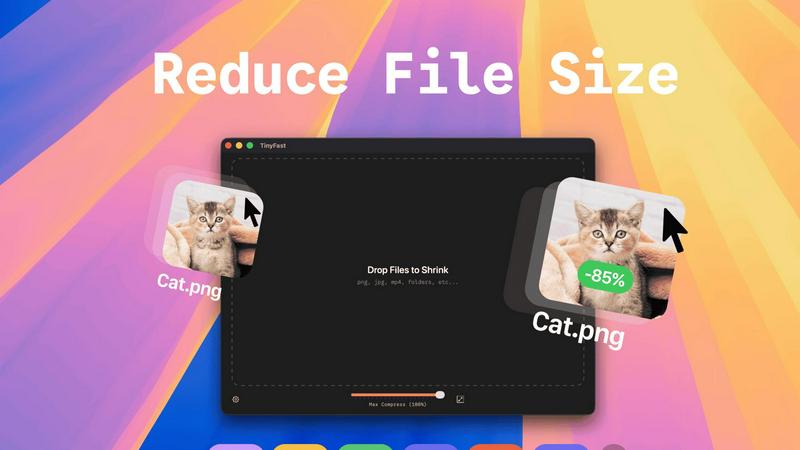
Effortlessly compress images, videos, and PDFs on your Mac with TinyFast's secure drag-and-drop functionality.
Last updated: February 28, 2026

voicebrief.io
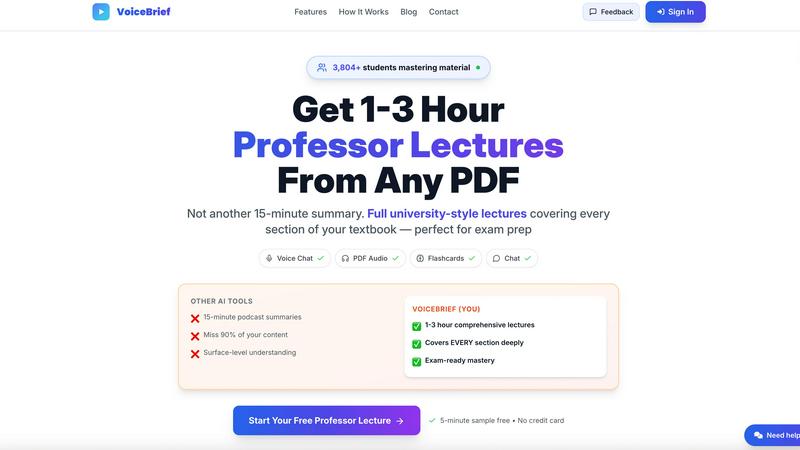
VoiceBrief converts PDFs into engaging audio lectures for smarter, on-the-go learning with instant AI support.
Last updated: February 28, 2026
Visual Comparison
TinyFast
voicebrief.io
Feature Comparison
TinyFast
Batch & Drag-Drop Shrink
TinyFast enables users to compress entire folders in one go, significantly enhancing productivity. By simply dragging and dropping a folder, users can achieve optimized outputs within seconds, making it an efficient choice for bulk file processing.
Blazing-Fast Compression
Harnessing optimized native engines built for speed, TinyFast allows users to shrink large files in seconds. Unlike online compression tools that require uploads and downloads, TinyFast eliminates waiting times, providing instant results for a smoother workflow.
Resize Resolution
For users who need to manage file sizes without sacrificing quality, TinyFast offers an automatic resizing feature for images and videos. This functionality allows users to set desired resolutions, ensuring that files are optimized for both size and visual clarity.
100% Local & Private
Privacy is a cornerstone of TinyFast's design. The application guarantees that files never leave the user's machine, as it requires no uploads to cloud servers. This local processing ensures total confidentiality, making it an essential tool for those with sensitive information.
voicebrief.io
AI-Powered Content Transformation
VoiceBrief utilizes advanced AI algorithms to convert any uploaded document—be it a PDF, photo, or handwritten notes—into high-quality audio. This feature allows users to absorb information in a lecture-style format, enhancing their learning experience.
Natural Human-Like Voices
The platform offers premium AI-generated voices that sound remarkably human, making the listening experience enjoyable and engaging. Users can select from a variety of voice options, ensuring that their learning is both effective and pleasant.
Interactive Voice Chat
With the AI voice chat feature, users can engage in a conversational manner with their virtual tutor. This allows them to ask questions related to their documents and receive immediate explanations, making learning more interactive and personalized.
Smart Quizzes and Flashcards
VoiceBrief generates quizzes and flashcards based on the content users upload, utilizing spaced repetition techniques. This feature helps reinforce learning and improve retention, making it easier for users to prepare for exams or master new material.
Use Cases
TinyFast
Efficient File Management for Designers
Graphic designers often work with high-resolution images that can take up significant storage space. TinyFast allows them to compress files efficiently, maintaining quality while freeing up storage for additional projects.
Video Optimization for Content Creators
Content creators frequently deal with large video files that require compression for faster uploads to platforms like YouTube. TinyFast allows for quick video optimization, enabling creators to streamline their publishing process without sacrificing video quality.
Document Handling for Developers
Developers often need to manage large documentation files, which can hinder collaboration and storage management. TinyFast can compress PDF and DOCX files quickly, making it easier to share documentation without overwhelming email systems or cloud storage.
Audio File Compression for Musicians
Musicians and podcasters who work with large audio files can benefit from TinyFast's capabilities. By compressing MP3 files, they can manage their libraries more effectively and ensure faster sharing of content across platforms.
voicebrief.io
Students Preparing for Exams
Students can convert their textbooks and lecture notes into audio format, allowing them to study while commuting or during other activities. This flexibility is particularly beneficial for those preparing for high-stakes exams, enabling them to maximize their study time.
Professionals Staying Updated
For busy professionals, VoiceBrief is an ideal tool to keep up with industry reports, whitepapers, and research papers. They can listen to key insights during their commute or while multitasking, ensuring they stay informed without sacrificing time.
Lifelong Learners Exploring New Topics
VoiceBrief caters to lifelong learners by allowing them to convert any PDF into an audiobook format. Whether interested in self-help, science, or history, users can explore a vast array of topics while engaging in daily activities.
Enhancing Class Engagement
Educators can use VoiceBrief to enhance classroom engagement by converting lecture materials into audio. This approach allows students to revisit complex topics at their own pace, facilitating better understanding and retention of the material.
Overview
About TinyFast
TinyFast is an innovative macOS application specifically designed for the fast and secure compression of various file types. Whether you're dealing with images, videos, or documents, TinyFast provides a seamless solution that prioritizes both speed and privacy. With its intuitive drag-and-drop interface, users can effortlessly compress file formats such as PNG, JPEG, MP4, MOV, PDF, SVG, WebP, MP3, and GIF without the need for uploads to cloud services. This makes TinyFast an ideal choice for developers, designers, and creators who handle sensitive data and require confidentiality in their workflows. Operating entirely offline, TinyFast ensures that your files remain secure on your device, allowing you to save valuable time and storage space without compromising data integrity. With an emphasis on performance, TinyFast is a must-have tool for anyone looking to optimize their file management processes quickly and securely.
About voicebrief.io
VoiceBrief.io is a transformative educational tool that redefines how learners interact with academic content. Designed for students and professionals alike, this platform converts dense materials—such as PDFs, textbooks, lecture notes, and even handwritten notes—into engaging audio lectures. This makes it possible for users to learn effectively on the go, whether they are commuting, exercising, or multitasking. VoiceBrief is particularly advantageous for those in demanding fields like medicine, engineering, law, and business, as well as individuals preparing for challenging exams like the CPA, CFA, and MCAT. By integrating an AI-powered professor feature, users can ask questions and receive instant, cited explanations, facilitating a deeper understanding of complex concepts. The platform not only saves time but also enhances information retention with auto-generated flashcards using spaced repetition techniques, making it an indispensable study companion for a wide variety of learners.
Frequently Asked Questions
TinyFast FAQ
Is TinyFast safe to use?
Yes, TinyFast is designed with privacy in mind. It operates entirely offline, ensuring that your files never leave your device, providing a secure solution for file compression.
What file types does TinyFast support?
TinyFast supports a wide range of file types, including images (PNG, JPEG, GIF), videos (MP4, MOV), documents (PDF, DOCX), code files (JS, CSS, JSON), and audio files (MP3).
Can I compress multiple files at once?
Absolutely! TinyFast has a batch processing feature that allows you to drag and drop entire folders for compression, optimizing multiple files in seconds.
Is there a free version of TinyFast?
Yes, TinyFast offers a free version that allows users to compress up to 5 files per day while accessing all features, making it a great option for light users.
voicebrief.io FAQ
How does VoiceBrief work?
VoiceBrief operates in three simple steps: users upload any document, the AI processes the content to generate audio, and then they can listen to the material anytime and anywhere.
Can I interact with the AI while listening?
Yes, VoiceBrief includes an interactive voice chat feature that allows you to ask questions about the content you are listening to, receiving immediate, detailed explanations.
What types of documents can be converted to audio?
VoiceBrief supports a wide range of document types, including PDFs, photos, handwritten notes (using OCR), and URLs, making it versatile for various learning materials.
Is there a money-back guarantee?
Yes, VoiceBrief offers a 30-day money-back guarantee, allowing users to try the platform risk-free and decide if it meets their learning needs.
Alternatives
TinyFast Alternatives
TinyFast is a cutting-edge macOS application designed for the swift and secure compression of various file types, including images, videos, and documents. As part of the tech tools category, it caters to developers, designers, and creators who prioritize privacy and efficiency in their workflows. Users often seek alternatives to TinyFast for reasons such as pricing, specific feature requirements, or compatibility with different operating systems. When choosing an alternative, it’s essential to consider factors such as the range of file types supported, compression speed, user interface design, and the level of security offered. Additionally, reviewing whether the solution operates offline or requires internet connectivity can significantly impact your decision based on your privacy concerns and workflow needs.
voicebrief.io Alternatives
VoiceBrief.io is an advanced educational tool designed to enhance the learning experience by converting PDF documents into immersive audio lectures. This platform falls within the productivity and management category, catering to students and professionals who seek to engage with complex academic materials more effectively. Users often search for alternatives to VoiceBrief due to considerations such as pricing, specific feature sets, or compatibility with different devices and platforms. When selecting an alternative, it's essential to evaluate factors like audio quality, user interface, integration capabilities, and the range of supported document formats to ensure the new tool aligns with individual learning styles and needs.