
EditTextImage
EditTextImage seamlessly edits text in images online while preserving font, color, lighting, and perspective without Photoshop or font installs.
Visit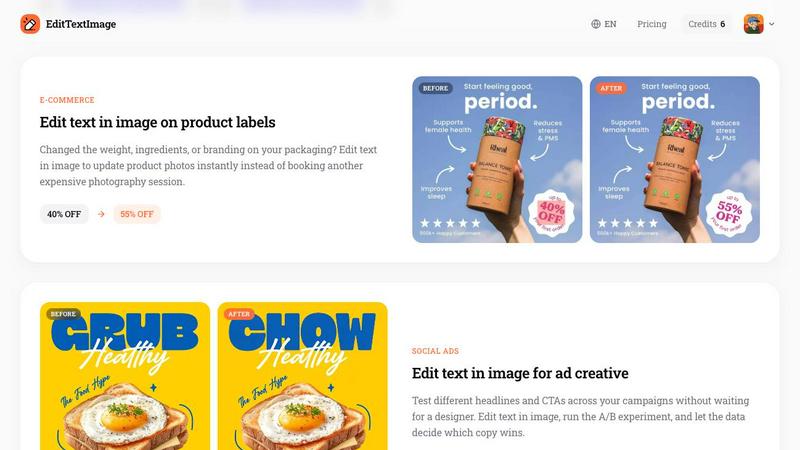
About EditTextImage
EditTextImage is an online AI tool that allows you to edit text in image files directly from your browser, without requiring any design software, font installations, or subscription commitments. The core value proposition is simple: upload an image, specify the original text and your replacement, and the AI handles the rest by sampling the typeface, color, lighting, drop shadow, and perspective straight from the pixels. This means even paid fonts, hand-lettering, or custom typography that you do not have installed on your system can be seamlessly replaced while keeping the surrounding design intact. The tool is designed for anyone who needs to make quick text changes on finished images like posters, screenshots, product photos, documents, or social media creatives when the original source design file is lost or unavailable. Typical use cases include fixing typos, swapping dates, updating pricing, localizing app screenshots into multiple languages, or running A/B tests on ad headlines. The AI delivers a 2K-resolution output in approximately 10 seconds, making it one of the fastest and most accessible solutions for text replacement in images. The first edit is free with no credit card required, and subsequent usage is based on a simple credit system with no recurring fees. The product is built with a strong focus on ethical use, explicitly prohibiting edits intended to deceive third parties or tamper with official documents, IDs, or financial records.
Features of EditTextImage
Pixel-Perfect Font and Style Preservation
The AI samples the typeface, color, size, perspective, drop shadow, and background texture directly from the pixels of the original image. This approach eliminates the need to locate and install the exact font file used in the design. Whether the text uses a paid commercial font, a custom hand-lettered style, or a generic system typeface, the replacement text will match the original appearance with high accuracy. The surrounding pixels remain undisturbed, so the overall layout and visual integrity of the image are maintained.
Fast Processing with High Resolution Output
The entire text replacement workflow completes in an average of 12 seconds, making it suitable for both quick fixes and production workflows. The output is rendered at 2K resolution, ensuring the edited image retains sufficient detail for digital publishing, social media sharing, and print-ready use cases. This speed does not compromise quality, as the AI processes the image locally in the browser after upload, providing near-instant results.
No Software Installation or Subscription Required
EditTextImage operates entirely online through a web browser. There is no need to download, install, or update any desktop software. The tool does not require a monthly or annual subscription. Instead, it uses a straightforward credit system where users purchase a one-time pack of 30 edits for $9.90, and credits never expire. This makes it a cost-effective alternative to maintaining a full Adobe Creative Cloud subscription or paying recurring fees for Canva Pro.
Comprehensive Input Format and Size Support
The tool accepts PNG, JPEG, and WebP image formats with a maximum file size of 10 MB. This covers the vast majority of common image types used in digital marketing, documentation, app development, and e-commerce. The upload process is simple, supporting drag-and-drop or click-to-upload functionality. The AI is designed to handle images containing text with various orientations, including horizontal, angled, and perspective-warped text, as well as text on complex backgrounds.
Use Cases of EditTextImage
Document Corrections and Updates
When the original design file for a contract, invoice, or official document is lost, and only a screenshot or scanned PDF image remains, EditTextImage enables quick text corrections. Users can fix typos in names, update invoice numbers, correct dates, or change terms without needing to recreate the entire document from scratch. This is especially useful for administrative teams, legal assistants, and small business owners who frequently work with finalized documents that require minor text adjustments.
Localization of App Screenshots
App developers and product managers often need to submit app store screenshots in multiple languages for international markets. Instead of rebuilding each UI mockup with new text layers, EditTextImage allows users to swap the language on existing screenshots directly. The AI preserves the font, button styles, and interface layout, resulting in pixel-perfect localized assets that meet app store guidelines. This dramatically reduces the time and cost associated with manual localization workflows.
A/B Testing for Social Media and Ad Creatives
Marketing teams can use EditTextImage to rapidly generate multiple variations of ad creatives for A/B testing. By changing headlines, call-to-action buttons, or promotional text on a finished image, teams can test different copy without waiting for a designer to recreate the asset. The tool enables quick iteration cycles, allowing data-driven decisions on which headline or offer drives better engagement. This is ideal for social media managers, performance marketers, and growth teams.
Reusing Event and Promotional Materials
Event organizers and marketing professionals can repurpose high-quality flyers, posters, and banners from previous campaigns by simply updating the date, venue, or speaker information. Instead of hiring a designer to recreate the layout from scratch, EditTextImage allows the existing image to be edited directly. This saves hundreds of dollars per season and ensures brand consistency across multiple event iterations. Common applications include gala invitations, conference schedules, and seasonal sale posters.
Frequently Asked Questions
How does EditTextImage preserve the original font if I don't have it installed?
The AI does not require the font file to be installed on your system. It analyzes the pixels of the original text in the uploaded image to sample the typeface characteristics, including letter shapes, stroke thickness, spacing, and any stylistic variations. It then generates the replacement text using this sampled information, matching the font style, color, drop shadow, and perspective as closely as possible. This works for both standard digital fonts and custom hand-lettering.
What happens to the background and surrounding elements when text is replaced?
The AI is designed to inpaint the area behind the original text with the surrounding background before placing the new text. This means the background texture, gradient, or pattern is reconstructed seamlessly. The new text is then rendered on top of this reconstructed background, preserving the original layout. In most cases, the result is indistinguishable from an edit made in the original design file, provided the background is not extremely complex or the text is not overlapping critical visual elements.
Is there a limit on how many times I can use the tool?
New users receive one free credit to try the tool without providing a credit card. After the free credit is used, you can purchase a one-time pack of 30 edits for $9.90. Credits never expire, meaning you can use them at your own pace without any time pressure. There is no monthly subscription or recurring charge. If you need more than 30 edits, you can purchase additional packs as needed.
What types of images are not allowed to be edited?
EditTextImage has strict acceptable use policies. The tool cannot be used to edit IDs, passports, visa support letters, official government seals, bank statements, or tampered receipts. Edits intended to deceive third parties, including for visa or immigration submissions, fake refund or transaction proofs, or email and chat screenshots altered to falsify sender or content, are strictly prohibited. Violations result in account termination without refund, and request logs may be shared with law enforcement.
Pricing of EditTextImage
EditTextImage operates on a simple, transparent pricing model with no hidden fees or recurring subscriptions. New users receive one free credit immediately upon signing in with Google, with no credit card required. This allows you to test the tool on a single image before making any financial commitment. After the free credit is used, the standard pricing is a one-time payment of $9.90 for 30 edits. This is a credit pack, not a subscription, meaning the credits never expire and can be used at any time. There are no monthly or annual fees, no tiers with limited features, and no additional costs for commercial use. The output resolution is always 2K, regardless of whether you are using a free credit or a paid credit. This makes EditTextImage a highly cost-effective alternative to maintaining a full design software subscription for users who only need occasional text edits on images.
Similar to EditTextImage

AI video and AI image generation built for real workflows


Create videos from prompts and images with RunwayAI, featuring output controls, task tracking, previews, downloads, and API resources.

Prompt-based image editing and generation for backgrounds, objects, text, products, posters, outpainting, styles, and Qwen Image workflows.

Generate and edit production-ready images with Seedream 5.0 Pro and Lite for ecommerce, marketing, social media, infographics, and branded content.

Turn any photo into a real Apple Live Photo that animates when you wake your iPhone. Restyle it and choose the motion - customizable.

Create polished AI images and videos from prompts or references for social posts, ads, flyers, album covers, and campaigns.

Private browser-based AI image generation and editing with text-to-image, targeted edits, and multi-image references.