
Font generator
Font Generator converts plain text into Unicode fonts for seamless copy-paste on Instagram, TikTok, Discord, and Roblox.
Visit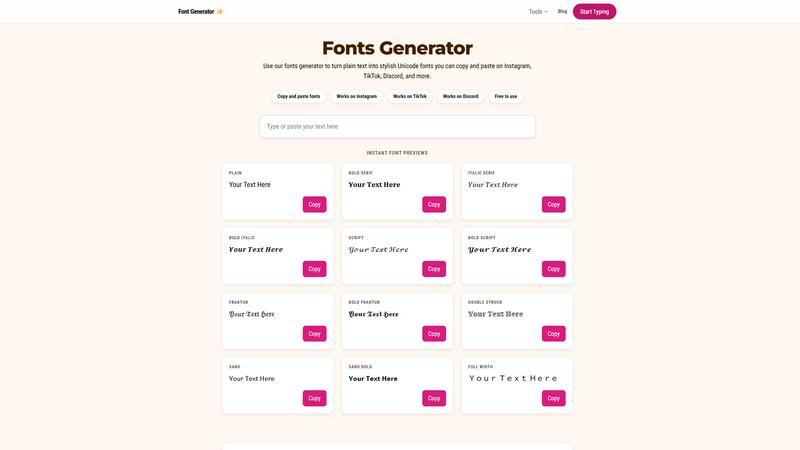
About Font generator
Font generator is a web-based utility that converts plain, standard ASCII text into a wide array of stylized Unicode fonts. Unlike traditional typography tools that require font file installation, this generator operates entirely within the browser, leveraging the Unicode standard to transform alphanumeric characters into visually distinct symbols. The core value proposition lies in its seamless copy-paste functionality, allowing users to instantly apply these styles across virtually any modern digital platform, including Instagram, TikTok, Discord, Roblox, Facebook, and X. The tool is designed for a broad audience, from social media influencers and content creators looking to enhance their brand identity, to gamers seeking unique usernames, and professionals wanting to add a personal touch to bios or messages. It eliminates the friction of manual formatting or graphic design software, providing an immediate, no-cost solution for text customization. The generator’s technical foundation is its integration with a comprehensive Unicode character map, enabling it to produce styles like bold serif, italic script, gothic Fraktur, double-struck, and full-width text. This approach ensures high compatibility across different operating systems and applications, as the output is pure text, not an image or a proprietary font file. The product also includes a suite of related tools for generating cursive, small text, symbols, and platform-specific formatting, making it a centralized hub for all text styling needs. Its primary audience includes individuals who want to stand out in crowded social feeds, create visually cohesive content, or simply experiment with different aesthetic looks without any technical barriers. The tool’s simplicity, speed, and broad platform compatibility are its key differentiators in a market of similar utilities.
Features of Font generator
Instant Unicode Font Conversion
The core engine of the font generator is its ability to instantly convert plain text into a diverse range of Unicode-based font styles. As a user types or pastes text into the input field, the tool dynamically generates multiple previews simultaneously, including bold serif, italic serif, script, Fraktur, double-struck, sans-serif, and full-width variants. This real-time processing eliminates any waiting period, allowing for rapid visual comparison. The conversion logic maps each standard ASCII character to its corresponding Unicode code point for the selected style, ensuring that the output is a string of characters that can be interpreted by any modern application. This technical approach bypasses the need for server-side rendering or font file downloads, making the tool entirely client-side and incredibly responsive. The result is a frictionless experience where users can see exactly how their text will look in dozens of different aesthetic styles before committing to one. This feature is critical for users who need to quickly iterate on a caption, username, or bio to find the perfect visual match for their content.
Comprehensive Style Library
The generator boasts an extensive library of font styles that goes beyond basic bold and italic. It includes specialized categories like cursive, gothic, bubble, glitch, and tiny text, each with multiple sub-variants. For example, the script category offers both standard script and bold script, while the gothic category includes Fraktur and bold Fraktur. This breadth of options allows users to fine-tune their text’s aesthetic to match a specific mood or platform trend. The library is curated based on popular search intents, ensuring that the most requested styles, such as those for Instagram bios or Discord usernames, are prominently featured. Each style is generated using unique Unicode character ranges, meaning that a letter like "A" in cursive is a completely different Unicode symbol than a bold serif "A". This technical distinction is important because it ensures that the styled text remains text, not an image, preserving its searchability and editability on the target platform. The library is regularly updated to include new and emerging Unicode trends, keeping the tool relevant for the ever-changing landscape of online text styling.
Platform-Specific Optimization
A key feature of this font generator is its awareness of platform-specific text rendering limitations and best practices. The tool provides dedicated sections and recommendations for popular platforms like Instagram, TikTok, and Discord. For Instagram, it highlights cursive, aesthetic, and cute styles that are known to render well in bios and captions. For TikTok, it suggests bold, bubble, and glitch-inspired styles that stand out in fast-scrolling short-form content. For Discord, it emphasizes gothic, bold, and glitch styles for usernames and chat messages. This platform-specific guidance is based on an understanding of each platform’s text field constraints, character limits, and typical user behavior. The tool also notes that while most standard Unicode characters have broad compatibility, highly decorative or obscure symbols may render differently on older devices or specific operating systems. By providing this contextual advice, the generator helps users avoid the common pitfall of choosing a style that looks great in the preview but appears as broken symbols or boxes on their target platform. This feature significantly reduces trial and error, making the tool more efficient and reliable for its users.
One-Click Copy and Paste Functionality
The user interface is designed around a frictionless copy-paste workflow. Each generated font style is presented in its own preview box, accompanied by a prominent "Copy" button. Clicking this button automatically copies the styled Unicode text to the user’s clipboard, bypassing the need for manual text selection. This one-click action is powered by the modern Clipboard API, which is supported by all major browsers. The technical implementation ensures that the copied text retains its Unicode formatting, meaning it will paste correctly into any text field that supports Unicode, including web forms, mobile apps, and desktop applications. This feature is crucial for the tool’s primary use case, as it eliminates the most common point of friction in the workflow: the difficulty of selecting and copying styled text that may contain non-standard characters. The interface also provides a visual confirmation after copying, often through a brief animation or a change in the button’s text to "Copied!", giving the user immediate feedback. This streamlined interaction is designed to minimize the number of steps from text input to final paste, making the tool incredibly fast and intuitive for repetitive use.
Use Cases of Font generator
Enhancing Social Media Bios and Profiles
A primary use case is creating visually distinctive bios and profile names on platforms like Instagram, TikTok, X, and Facebook. Users can input their name, tagline, or a short bio into the generator and browse through styles like cursive, bold, or gothic to find one that aligns with their personal brand or aesthetic. For example, a photographer might use a clean sans-serif bold font for their name and a cursive style for a tagline like "Capturing Moments." This allows for text-based branding without the need for custom graphics or image editing software. The key technical advantage here is that the styled text remains searchable and indexable by the platform’s algorithms, unlike text embedded in an image. This means a user’s styled bio will still appear in search results for relevant keywords. The tool’s platform-specific recommendations help users choose styles that will render correctly within the character limits and text field constraints of each social network, ensuring a polished and professional appearance.
Creating Unique Gaming Usernames
For gamers on platforms like Discord, Roblox, and Steam, a unique username is a key part of their online identity. This font generator allows users to transform a standard username into a stylized version that stands out in friend lists, leaderboards, and chat channels. Styles like gothic Fraktur, bold script, and glitch text are particularly popular for creating a dramatic or edgy persona. The technical compatibility is high because these platforms support a wide range of Unicode characters in their username fields. Users can experiment with different styles to see which one fits their in-game character or guild theme. The tool’s ability to generate multiple styles instantly is crucial here, as users often want to compare several options before settling on one. This use case highlights the generator’s role in personalizing digital spaces where visual distinction is highly valued.
Formatting Messages for Emphasis in Chats
In messaging apps like Discord, Slack, and Telegram, users can use the font generator to add emphasis to specific words or phrases in their messages. While most platforms support basic markdown for bold and italics, the generator offers a wider variety of styles that can convey different tones. For example, a user might paste a glitch-style word to express excitement or a small text style for a sarcastic aside. This technique is particularly effective in group chats where users want to break the monotony of standard text. The technical aspect is straightforward: the user types their message, selects the parts they want to stylize, generates the styled version, and pastes it back into the chat. The key is that the styled text will display correctly for all users in the chat, as long as their client supports the necessary Unicode characters. This use case demonstrates the tool’s utility for everyday communication, not just profile creation.
Designing Aesthetic Content for Social Posts
Content creators can use the font generator to design text overlays for images, videos, and stories on platforms like Instagram and TikTok. By generating a stylish caption or a call-to-action in a unique font, they can make their content more visually appealing without needing advanced graphic design skills. For instance, a food blogger might use a cute bubble font for a recipe title or a bold serif font for a list of ingredients. The generated text can be pasted directly into image editing apps like Canva or into the text tool of video editing software. The technical advantage is that the Unicode text maintains its formatting across different applications, ensuring consistency in the final post. This use case is especially popular for creating highlight covers, story text, and pin titles on Pinterest, where aesthetic consistency is key to building a recognizable brand.
Frequently Asked Questions
How does a font generator work technically?
A font generator works by mapping each character of your plain text to a specific Unicode character that visually resembles a different font style. For example, the standard Latin letter "A" (U+0041) can be converted to the mathematical bold italic "A" (U+1D468) or the Fraktur "A" (U+1D504). The tool maintains a lookup table for each style, translating your input into a string of these alternative Unicode code points. The output is not a font file but a sequence of special symbols that applications render using their own default font. This is why the styled text works across different platforms without requiring any installation—it is pure text, just using different characters.
Will the styled fonts work on all platforms and devices?
While most modern platforms and devices support a wide range of Unicode characters, compatibility is not universal. Common styles like bold, italic, and sans-serif are almost always supported. However, more decorative styles like Fraktur, double-struck, or script may render as boxes, question marks, or other fallback characters on older devices, specific operating systems, or in certain text fields that have strict character whitelists. It is always recommended to test your styled text on the target platform before finalizing it. The font generator provides general guidance on which styles are safest for each major platform, but individual results may vary based on the user’s and their audience’s device configuration.
Is it free to use the font generator?
Yes, the font generator is completely free to use. There are no subscription fees, paywalls, or usage limits. All features, including the full library of font styles and the copy-paste functionality, are accessible without any registration or payment. The tool is supported through other means, such as advertising or as part of a larger suite of free online utilities. This free access model ensures that anyone, from casual social media users to professional content creators, can use the tool without financial barriers.
Can I use these fonts for commercial purposes?
Yes, you can use the styled text generated by this tool for commercial purposes. Since the output is composed of standard Unicode characters, it is not subject to the same licensing restrictions as commercial font files. You are free to use the styled text in logos, advertisements, product names, social media marketing, and any other commercial application. However, it is important to note that the visual style is dependent on the Unicode standard and may not be unique to your brand. Additionally, while the text itself is free to use, any specific arrangement or combination of characters could potentially be subject to trademark or copyright if it forms a distinctive brand identifier.
Similar to Font generator

AI growth tool for X and LinkedIn: write posts in your voice, schedule at your best times, find leads on X and see what works.

Verla is an AI academic assistant for university and college students, combining AI essay writing, academic research, AI detection, AI humanization

Create and edit AI images online with multiple models, text-to-image, image-to-image, background removal, and upscaling.

Turn a photo of your pet into new pictures or short animations with AI. Sign in for a free 1K image daily.

AI image generation and editing with sharp typography, native 2K output, and localized edits.

Upload one portrait. Bulin AI puts you in the official Bulin 47 freestyle. The source video guides the moves and camera. No prompt.

Two photos become one hotel lobby video. One person stands on each side of the hanging microphone. No prompt.
