
Picture Enhancer
Picture Enhancer uses AI to deblur, upscale, and restore photos in your browser with no software install and three free guest tries.
Visit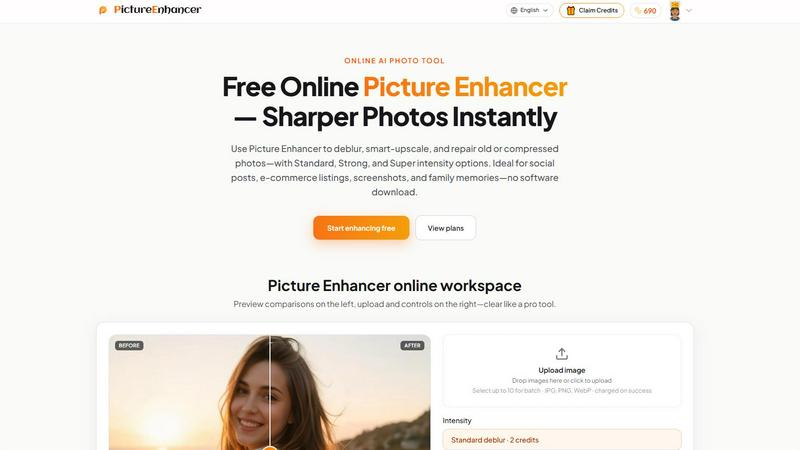
About Picture Enhancer
Picture Enhancer is a free online AI photo enhancement tool designed for creators, sellers, and everyday users who need sharper, higher-quality images instantly without complex software or technical expertise. This product leverages advanced AI processing to deblur, upscale, and restore photographs across standard web formats including JPG, PNG, and WebP. The core value proposition is delivering watermark-free, professional-grade results through a simple three-step workflow: upload an image, choose a mode and intensity level, then download the enhanced output. Picture Enhancer accommodates both guest users and registered members. Guests receive three free lifetime enhancement tries per IP address with no signup required, making it accessible for quick one-off tasks. Signed-in users operate on a credit-based system where new accounts receive starter credits, and credits are deducted only upon successful job completion. The product offers three distinct enhancement modes: Deblur for sharpening soft or motion-blurred images, Upscale for enlarging images up to 4x with added detail, and Restore for repairing scratches, fade, and compression artifacts. Each mode features three intensity tiers: Standard, Strong, and Super, with Super tiers and batch processing reserved for paid subscribers and permanent credit pack holders. Picture Enhancer is ideal for social media content creation, e-commerce product listings, screenshot cleanup for documentation, and restoring old family photographs. The platform emphasizes privacy with secure, private processing used only to complete enhancement requests, and results are delivered within seconds. This tool integrates seamlessly into content workflows where image quality directly impacts engagement, conversion, and professional presentation.
Features of Picture Enhancer
AI Deblur Mode
Picture Enhancer's AI Deblur mode intelligently rebuilds lost edges, texture, and detail from common image quality issues including camera shake, soft focus, and mild motion blur. Users can select from Standard, Strong, or Super deblur intensity tiers to match the severity of blur present in the original image. This feature ensures that critical elements like faces, text, and product details regain clarity and readability, making it suitable for salvaging imperfect captures from smartphones, digital cameras, or screenshots. The AI model processes the image privately and returns results in seconds.
Smart Upscale Mode
The Smart Upscale mode enables users to enlarge images by 2x or 4x while intelligently adding realistic detail rather than simply stretching pixels. This feature is essential when working with small source files for use cases like social media cover images, product hero shots on e-commerce platforms, or preview prints. Unlike traditional interpolation methods that produce blurry or blocky enlargements, Picture Enhancer's AI analyzes the image content and synthesizes high-frequency details, resulting in sharp, natural-looking enlargements suitable for professional display.
Old Photo and Damage Restore Mode
Picture Enhancer's Restore mode is designed to repair aged, damaged, or heavily compressed photographs. It reduces visible scratches, eliminates color fade, and removes compression artifacts that degrade image quality. The Strong and Super restore intensity tiers are specifically tailored to handle heavier damage commonly found on scanned family prints, vintage photographs, or images extracted from low-quality sources. This feature breathes new life into archival content, making it ready for digital sharing, printing, or integration into modern media projects.
Intensity Tier System and Credit Billing
The product implements a three-tier intensity system (Standard, Strong, Super) that allows users to fine-tune the enhancement strength based on the condition of their source image. Credits are charged only when a job succeeds, ensuring users pay only for usable results. Standard enhancements cost 2 credits, Strong costs 4 credits, and Super costs 6 credits. This transparent billing model, combined with free guest trials, gives users confidence to test the tool before committing to paid plans. Super tiers and batch processing (up to 10 images) are unlocked exclusively for paid users via monthly subscriptions or permanent credit packs.
Use Cases of Picture Enhancer
Social Media Content Creation
Content creators and social media managers can use Picture Enhancer to quickly sharpen soft or blurry photos before posting to platforms like Instagram, Facebook, Twitter, or LinkedIn. The AI deblur and upscale modes ensure that profile pictures, feed images, and story visuals maintain crisp detail even when captured in less-than-ideal lighting conditions. The ability to enhance images without watermarks and in seconds allows for rapid iteration and publishing, directly improving engagement metrics and visual brand consistency across social channels.
E-commerce Product Photography
Online sellers and marketplace vendors can leverage Picture Enhancer to upscale product shots and reduce compression noise, making listings stand out in crowded search results. The Smart Upscale mode is particularly valuable when working with small source images provided by manufacturers or when resizing thumbnails for hero banners. Sharper product images with clearer text on packaging and finer detail on materials lead to higher click-through rates and conversion. The batch enhance feature (available to paid users) streamlines processing multiple product images simultaneously.
Screenshot and UI Documentation
Technical writers, support teams, and developers can use Picture Enhancer to sharpen text edges in screenshots for tutorials, knowledge base articles, bug reports, or documentation archives. The Deblur mode effectively cleans up low-resolution screen captures, making UI elements, code snippets, and instructional annotations legible at any display size. This capability ensures that technical documentation remains professional and accessible, reducing support overhead and improving user self-service success rates.
Family Photo Restoration and Preservation
Individuals digitizing old family albums can rely on Picture Enhancer's Restore mode to repair scratches, reduce fade, and eliminate dust spots from scanned prints. The Strong and Super intensity settings handle heavily damaged photographs, restoring clarity to faces and backgrounds that have degraded over decades. This use case transforms fragile physical memories into high-quality digital assets suitable for sharing with family members, printing for display, or archiving in cloud storage for long-term preservation.
Frequently Asked Questions
What is Picture Enhancer?
Picture Enhancer is a free online AI-powered photo enhancement tool that enables users to deblur, upscale, and restore images without downloading software. It supports JPG, PNG, and WebP formats and offers three intensity levels: Standard, Strong, and Super. The tool is designed for creators, sellers, and everyday users who need sharper, higher-quality images quickly. Guests receive three free lifetime tries per IP, and signed-in users operate on a credit-based system with credits charged only on successful enhancements.
Can I try Picture Enhancer without signing in?
Yes, guests can try Picture Enhancer without signing in. Each IP address receives three free lifetime tries. This allows users to test the deblur, upscale, and restore modes at any intensity level before deciding to create an account. Guest users process one image at a time and receive watermark-free downloads on successful enhancements. After exhausting guest tries, users must sign in and use credits to continue enhancing images.
How does credit billing work after sign-in?
After signing in, new accounts receive starter credits to begin enhancing immediately. Credits are deducted only when an enhancement job succeeds, meaning users are never charged for failed attempts. Standard intensity costs 2 credits, Strong costs 4 credits, and Super costs 6 credits. Paid users unlock Super tiers and batch enhancement (up to 10 images at once). Monthly subscription plans grant credits each billing cycle, while permanent credit packs never expire and can be used at any time.
Which modes does Picture Enhancer support?
Picture Enhancer supports three primary enhancement modes: Deblur for sharpening soft or motion-blurred images, Smart Upscale for enlarging images 2x or 4x with added detail, and Restore for repairing scratches, fade, and compression artifacts. Each mode is available in Standard, Strong, and Super intensity tiers. The appropriate mode and intensity depend on the source image condition and the desired output quality. Super tiers are available to paid users only.
Will downloads include a watermark?
No, all successfully enhanced images downloaded from Picture Enhancer are watermark-free. This applies to both guest users and signed-in members. Users receive the original enhanced file without any branding overlays, making the output suitable for professional use, social media posting, e-commerce listings, and printing. The before/after comparison slider is available during preview but is not present in the final downloadable file.
What is the difference between subscription and permanent credit packs?
Monthly subscription plans provide users with a set number of credits each billing cycle, which renew automatically. This option is ideal for users with ongoing enhancement needs. Permanent credit packs are one-time purchases that never expire, suited for occasional users who want credits available on demand without recurring payments. Both plan types unlock Super intensity tiers and batch enhancement capabilities. Users can check their balance and transaction history in the My Assets section of their account.
Are my photos safe?
Yes, Picture Enhancer processes all images securely and privately. Uploaded photos are used only to complete the enhancement request and are not stored, shared, or used for training purposes beyond the immediate job. The platform employs encrypted connections and follows strict data handling policies to protect user content. After the enhancement is complete and the download is made, users have control over their files. The privacy policy details specific data retention and processing practices.
Where do I check balance and history?
Signed-in users can view their credit balance, transaction history, and previously enhanced images in the My Assets section of their account. This area provides a clear breakdown of credits used, successful jobs, and any pending or failed requests. Users can also revisit and re-download past enhancements. For billing inquiries, subscription management, or refund requests, users should refer to the Terms of Service and Refund Policy pages available on the website footer.
Explore more in this category:
Similar to Picture Enhancer

Create and edit AI images online with multiple models, text-to-image, image-to-image, background removal, and upscaling.

AI image generation and editing with sharp typography, native 2K output, and localized edits.

AI-powered image text editor to edit, replace, fix, or translate text in images while preserving the original font, color, size, and style.

Create cinematic AI videos, product ads, social shorts, and images from a prompt in minutes.

Create release-ready album covers from a prompt or photo. Generate, refine, and export art for singles, EPs, mixtapes, and playlists.

A free browser-based toolkit for creating, cutting, converting, and previewing sprite sheet animations.

AI video and AI image generation built for real workflows
