
ProcessSpy
ProcessSpy is a powerful process monitor for macOS that delivers in-depth analysis and real-time insights into system performance and processes.
Visit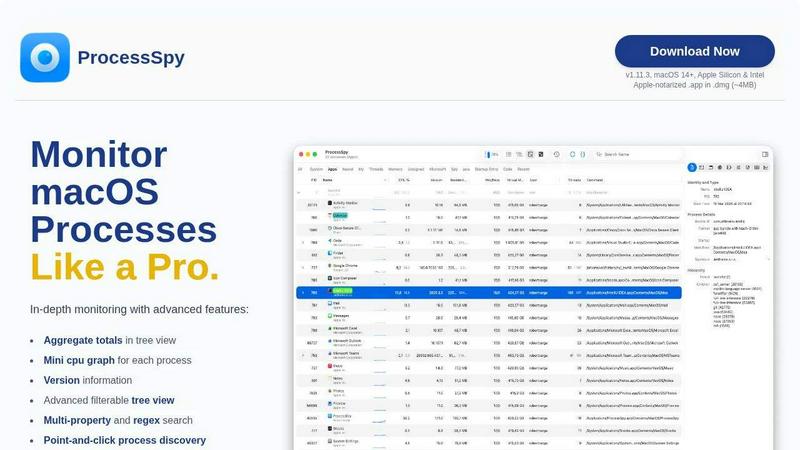
About ProcessSpy
ProcessSpy is a powerful macOS Process Explorer and advanced monitoring tool designed for developers and power users who need in-depth insight into their system processes. Unlike the standard Activity Monitor, ProcessSpy reveals what is often hidden, providing a comprehensive view of process trees, open files, environment variables, and more. Its native integration with macOS ensures a seamless experience, leveraging native APIs to deliver fast and responsive performance. This tool is particularly beneficial for developers working with multiple applications requiring different Java Development Kit (JDK) versions, as it allows them to quickly identify and manage processes that might otherwise be indistinguishable. With features such as advanced filtering, process history recording, and detailed context menu actions, ProcessSpy enhances your ability to monitor and control your system, making it an essential tool for anyone needing to analyze process behavior in detail.
Features of ProcessSpy
Advanced Tree View
ProcessSpy’s advanced tree view offers real-time filtering and search capabilities, enabling users to easily navigate and analyze running processes. It aggregates totals for CPU, Memory, and Threads, providing a comprehensive overview of resource utilization at a glance.
Javascript Filters
The tool allows users to create complex filters using Javascript, making it easier to customize the search experience. This feature is particularly useful for power users needing to apply multiple conditions to refine their process investigations effectively.
Environment Variables (Paid)
Unlocking the environment variables feature provides insights into the operating environment of a process. Users can view critical information about how each process is configured, which is invaluable for debugging and performance optimization.
Process History Recording (Paid)
ProcessSpy includes a process history recording feature that tracks CPU, Memory, and Threads usage over time. Users can export this data to CSV, allowing for detailed analysis and reporting, especially useful in performance tuning and long-term monitoring.
Use Cases of ProcessSpy
Development and Debugging
For developers managing multiple applications, especially Java applications, ProcessSpy helps distinguish between processes that share the same name. This enables efficient debugging and optimization by revealing the specific JDK version and command-line arguments used.
Performance Monitoring
System administrators can utilize ProcessSpy to monitor system performance in real-time. By analyzing CPU and memory usage across processes, they can identify resource hogs and optimize system performance, ensuring that applications run smoothly.
Security Auditing
Security professionals can use ProcessSpy to inspect running processes for unauthorized or suspicious activity. By examining open files and environment variables, they can uncover potential security vulnerabilities or malicious software running on the system.
Resource Management
For users running resource-intensive applications, ProcessSpy provides insights into resource allocation and utilization. This helps in managing system resources effectively, allowing for proactive adjustments to maintain optimal system performance.
Frequently Asked Questions
Is ProcessSpy safe to install on my Mac?
Yes. ProcessSpy is Apple-notarized and distributed as a signed .app inside a .dmg file. It has been verified for safety and compatibility with both Intel and Apple Silicon Macs.
Does ProcessSpy support older versions of macOS?
ProcessSpy is specifically designed for macOS 14 and newer versions. Users on older macOS versions may not benefit from its advanced features.
What is the license model?
The licensing model for ProcessSpy allows one user to install the application on unlimited devices. It includes lifetime updates and access to new features, ensuring ongoing usability without additional costs.
How can I purchase the paid features of ProcessSpy?
The paid features of ProcessSpy can be unlocked through a one-time purchase on Gumroad for $24.99. This grants users lifetime access to updates and the ability to use the software on multiple devices without restrictions.
Similar to ProcessSpy

Jev turns text or JSON into Choice, Score and Noul answers with probabilities. Build decision flows and call the API.

Face recognition API, a drop-in replacement for AWS Rekognition. Index, search, compare and detect faces, billed per photo with no subscription.

Search 20,000+ open-source and SaaS tools by the job you need done or the app you want to replace.

No-code 2D game editor: visual node logic, drag-and-drop scenes, live preview. Exports to Windows, macOS, Linux, Android, iOS, Web.

Moderation, routing, intent and scoring for any text over one Jev-compatible API, hosted in the EU.

A free directory of 950+ projects built on Laya, the open-source decision model. Updated daily.

A free browser-based toolkit for creating, cutting, converting, and previewing sprite sheet animations.

The #1 Native Form Builder Plugin for Framer - No Code, No Embeds, No External Platforms.