
Easymotion - AI Motion Graphic Generator
Easymotion is an AI motion graphic generator that turns static images, data, and maps into polished videos for any platform.
Visit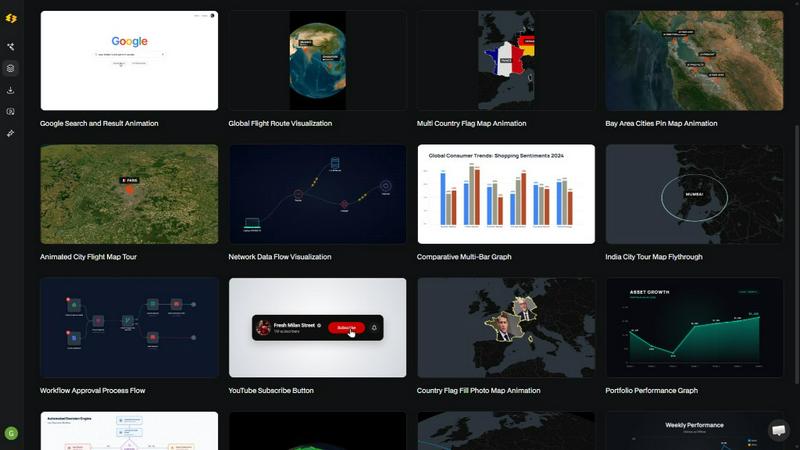
About Easymotion - AI Motion Graphic Generator
Easymotion is an AI-powered motion graphics generator and map animation platform engineered for content creators, video editors, startup founders, marketers, and data storytellers who need to produce polished animated videos without the steep learning curve of traditional editing software like Adobe After Effects. The platform fundamentally reimagines the motion graphics workflow by allowing users to generate complex animations from simple text prompts, static images, spreadsheets, or PDFs, all within a browser-based environment. At its core, Easymotion leverages artificial intelligence to handle keyframe creation, animation curves, timing, and visual composition, enabling users to bypass manual timeline editing entirely. The platform supports a diverse range of motion graphics formats including SaaS product promos, flowchart animations, animated charts and graphs, UI explainers, interactive quizzes, and dynamic map animations for geographic storytelling. For map-based content, users can create flight route visualizations, location pin animations, flag fill highlights, and other geographic narratives with minimal effort. After generating an initial animation, users can refine every aspect through natural language chat commands, adjusting colors, pacing, labels, layout, and visual style without touching a single keyframe. Easymotion also provides a premium template library featuring proven motion graphics layouts for maps, charts, social media interfaces, and brand content that can be instantly customized. The platform supports multiple export formats including MP4 and MOV with transparent alpha channel support, making it compatible with professional editing workflows. Output resolutions span 16:9 for YouTube and landscape content, 9:16 for TikTok and Instagram Reels, 1:1 for square social posts, and 4:5 for feed-friendly vertical formats, ensuring seamless integration across all major social media platforms.
Features of Easymotion - AI Motion Graphic Generator
Prompt-to-Animation Generation
Users can describe their desired animation in plain English and the AI instantly generates a complete motion graphics video. This feature eliminates the need for manual keyframing, timeline editing, or any technical animation skills. Simply type a prompt like "design a social media promo video for my coffee shop" and Easymotion produces a fully animated scene with appropriate transitions, timing, and visual elements. The AI interprets the intent, selects relevant motion graphics components, and assembles them into a coherent animated sequence that can be further refined through subsequent chat commands.
Image-to-Animation Conversion
Upload any static image and Easymotion's AI will analyze its composition and bring it to life with stunning motion effects. This feature is particularly valuable for transforming static product shots, infographics, or brand assets into engaging animated content. The AI identifies key visual elements within the image and applies appropriate motion paths, fade effects, and parallax movements to create depth and visual interest. Users can then customize the animation style, duration, and emphasis points through conversational edits without any manual animation work.
Data-to-Animation Pipeline
Easymotion directly supports CSV and XLSX file uploads, automatically converting raw spreadsheet data into professional animated data visualizations. The AI parses the data structure, identifies trends and categories, and generates appropriate chart types such as bar charts, line graphs, pie charts, or geographic heat maps. Each data point becomes an animated element with customizable colors, labels, and transition effects. This feature enables data storytellers to transform static reports into engaging animated videos that capture audience attention and drive engagement, with video posts achieving up to 5x more engagement than static images.
Map Animation Engine
The platform includes a dedicated map animation system for creating geographic visualizations including flight routes, location pins, country highlights, and global travel narratives. Users can define starting points, destinations, and waypoints to generate animated route lines with smooth path transitions. The map engine supports multiple geographic projections and styling options, allowing users to adjust map colors, label visibility, and animation pacing. Flag fill animations highlight specific countries or regions, making this feature ideal for travel content, logistics presentations, global business reports, and educational geographic storytelling.
Use Cases of Easymotion - AI Motion Graphic Generator
Social Media Content Production
Content creators and social media managers can rapidly produce platform-optimized animated videos for TikTok, Instagram Reels, YouTube Shorts, and Facebook feeds. Easymotion's support for 9:16, 1:1, 4:5, and 16:9 aspect ratios ensures every video is formatted correctly for its target platform without manual resizing. Users can generate promotional videos, product showcases, animated infographics, and map-based travel content directly from prompts or uploaded assets. The ability to iterate and refine animations through chat commands enables same-day campaign launches, with marketing teams shipping campaigns faster than traditional design workflows.
Data Visualization and Reporting
Analysts, data scientists, and business intelligence professionals can transform static charts and spreadsheet data into animated data stories that command attention in presentations, reports, and social media posts. By uploading CSV or XLSX files, users instantly generate animated bar charts, line graphs, and geographic visualizations that reveal trends over time. These animated data videos are particularly effective for quarterly business reviews, investor presentations, and thought leadership content on LinkedIn, where video posts consistently achieve higher engagement rates compared to static chart images.
Geographic and Travel Content Creation
Travel bloggers, logistics companies, and educational content producers can leverage Easymotion's map animation capabilities to create compelling geographic narratives. Flight route animations with multiple stops, location pin drops with custom labels, and country highlight sequences can be generated in minutes. This use case is especially valuable for travel influencers creating itinerary reels, logistics teams visualizing supply chain routes, and educators developing interactive geography lessons. The platform enables creators to produce professional-quality map animations that previously required hours of manual work in specialized mapping software.
Product Marketing and SaaS Demos
Startup founders and marketing teams can quickly produce animated product demos, feature walkthroughs, and promotional videos without hiring freelance animators or learning complex editing software. By describing their product's value proposition through prompts or uploading UI screenshots for animation, users can generate polished marketing content that highlights key features with motion graphics. The ability to customize colors, branding, and pacing ensures consistency with existing brand guidelines. Founders report growing their social presence effectively without the cost and turnaround time associated with freelance video production.
Frequently Asked Questions
What is Easymotion and how does it work?
Easymotion is an AI-powered motion graphics generator that enables users to create professional animated videos by describing their vision in plain English. The platform works in three simple steps: first, describe the animation you want or upload an image, spreadsheet, or PDF; second, refine the result using chat commands to adjust colors, timing, map styles, or visual elements; third, export your completed video as MP4 or with a transparent background for direct use in editing software. The AI handles all keyframe generation, animation curves, and timing automatically, eliminating the need for traditional timeline editing.
What types of videos can I create with Easymotion?
You can create a wide variety of motion graphics including SaaS product promos, flowchart animations, animated bar charts and line graphs, UI explainer videos, social media promotional content, travel route map animations, location pin visualizations, country highlight sequences, and interactive quiz animations. The platform supports both motion graphics and map animation formats, making it suitable for content creators, marketers, educators, and data storytellers. All videos can be exported in multiple aspect ratios optimized for different social media platforms.
How does the AI animation generation actually work technically?
The AI processes your text prompt or uploaded file through a combination of natural language understanding and computer vision models. For text prompts, the AI interprets the desired visual elements, motion style, and composition requirements. For image uploads, computer vision analyzes the visual structure to identify elements suitable for animation. For spreadsheets, data parsing algorithms extract trends and categories to generate appropriate chart types. The AI then applies predefined animation curves, timing patterns, and visual transitions to create a coherent animated sequence that can be further refined through conversational edits.
What export formats and resolutions does Easymotion support?
Easymotion supports export as MP4 and MOV video files, including videos with transparent backgrounds (alpha channel support) for seamless integration into professional editing workflows. The platform supports four aspect ratios: 16:9 for YouTube and landscape content, 9:16 for TikTok and Instagram Reels, 1:1 for square social media posts, and 4:5 for feed-friendly vertical formats. This ensures compatibility across all major social media platforms and video hosting services without requiring additional post-processing.
Similar to Easymotion - AI Motion Graphic Generator

Clone any webpage pixel-perfect, export HTML/CSS/ZIP or React/Vue components.

All-in-one AI workspace to generate images, videos, and audio with multiple leading AI models.

Every key you press lights up on an on-screen keyboard, and each shortcut is named as you press it.

An adaptive AI tutor that turns topics or your materials into courses, lessons, and answers tailored to how you learn.

Free open-source 2D CAD built in Rust. AutoCAD-style CLI drafting, layers, dimensions, DWG/DXF support, and AI-agent automation via MCP.

Create and edit AI images, generate videos, and compare models in one creative workbench.

Mainspring turns the settings macOS hides into 90+ one-click, fully reversible power-ups for Finder, Dock, screenshots and more. $29 once.
