
Symbol combos
Symbol Combos provides a copy-ready library of aesthetic symbols, kaomoji, and text dividers for decorating social bios, names, and captions.
Visit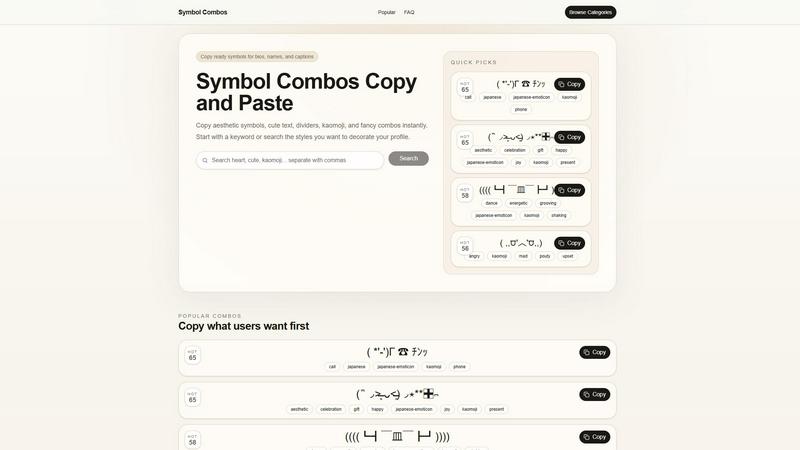
About Symbol combos
Symbol combos is a free, web-based copy-paste symbol library engineered for rapid integration into digital text workflows. It provides a curated, searchable repository of aesthetic symbols, cute text symbols, decorative dividers, kaomoji (Japanese emoticons), hearts, stars, and complex text combinations. The platform functions as a lightweight utility tool, eliminating the need for manual Unicode character searches or complex keyboard shortcuts. Users can instantly browse categorized collections and copy ready-made symbol combos to their clipboard with a single click, streamlining the process of adding visual flair to bios, captions, usernames, social media posts, messages, and creative profiles. Designed for a broad user base—from casual social media enthusiasts to content creators and gamers—Symbol combos prioritizes compatibility with major platforms including Instagram, TikTok, Twitter, Discord, and messaging apps. The tool’s architecture focuses on zero-friction access: no accounts, downloads, or plugins are required. It operates entirely in-browser, leveraging a clean interface where users can search by keyword (e.g., “heart,” “star,” “divider”) or browse popular and trending combos. Each symbol combo is tagged with relevant metadata (e.g., “aesthetic,” “cute,” “japanese-emoticon”) to enhance discoverability and integration into specific design contexts. The core value proposition is time efficiency and creative augmentation, allowing users to bypass the technical overhead of Unicode encoding and instead focus on expressive, personalized text formatting across any digital surface that supports standard character input.
Features of Symbol combos
Instant Clipboard Integration
Symbol combos employs a streamlined one-click copy mechanism that bypasses manual selection and right-click commands. Each combo is presented with a dedicated “Copy” button that instantly transfers the selected symbol string to the user’s system clipboard. This feature is engineered for high compatibility across operating systems (Windows, macOS, Linux, ChromeOS) and browsers (Chrome, Firefox, Safari, Edge), ensuring that copied symbols retain their intended formatting when pasted into target applications. The underlying architecture uses modern JavaScript Clipboard API calls, providing near-instantaneous feedback without page reloads or external dependencies.
Categorized Symbol Library
The platform organizes its extensive symbol collection into logical, searchable categories that align with common user intents. Categories include “Popular Combos,” “Quick Picks,” and thematic tags such as “aesthetic,” “kaomoji,” “divider,” “heart,” “star,” and “border.” Each symbol combo is further annotated with descriptive tags (e.g., “call,” “japanese-emoticon,” “celebration,” “angry”) that enable precise filtering. This metadata-driven structure allows users to rapidly narrow down options by mood, style, or application context, reducing the cognitive load of browsing through unrelated characters.
Real-Time Search Functionality
Symbol combos integrates a dynamic search bar that filters the entire symbol library in real-time as users type keywords. The search engine indexes both the visual representation of combos and their associated tags, enabling discovery through terms like “cute,” “dance,” “phone,” or “gift.” This feature is optimized for low-latency responses, providing instant visual feedback without requiring a page refresh or server round-trip. The search algorithm supports partial matches and synonyms, ensuring that users can find relevant symbols even with imprecise queries.
Trending and Popular Combos Feed
The platform surfaces a dynamically updated “Popular Combos” section that highlights symbol strings currently in high demand. Each combo in this feed displays its usage count (e.g., “HOT 65” or “HOT 58”), providing users with social proof of relevance and aesthetic approval. This feature effectively crowdsources curation, allowing users to immediately access community-validated designs for bios, usernames, and captions. The trending feed is refreshed based on aggregate copy events, ensuring that the most sought-after combos remain at the forefront of the interface.
Use Cases of Symbol combos
Social Media Profile Customization
Users can rapidly copy aesthetic symbol combos to personalize their Instagram, TikTok, and Twitter bios with decorative borders, dividers, and unique name stylizations. For example, a user searching for “aesthetic border” can instantly copy a combo like *゚+.。:;+.:;。+゚*♡*゚+.。:;+.:;。+゚ and paste it directly into their bio field, creating visual separation between text sections. This eliminates the need for manual Unicode character hunting and ensures compatibility with platform character limits.
Messaging and Chat Enhancement
Symbol combos enables users to add expressive kaomoji and decorative elements to messages in apps like Discord, WhatsApp, and Telegram. A user can search for “happy kaomoji” and copy ( ໊ ◞˃̶͈ ᴗ˂̶͈)◞⋆**✚⃞ྉ to convey celebration or gift-giving sentiments. These combos are designed to render correctly across different chat clients without breaking formatting, enhancing emotional expression in text-based communication.
Username and Gamer Tag Creation
Gamers and online community members can use Symbol combos to craft unique, visually distinctive usernames for platforms like Twitch, Steam, and Discord. By combining stars, hearts, and custom dividers, users can create memorable handles that stand out in crowded leaderboards or chat lists. The tool’s search functionality allows quick retrieval of symbols that fit specific gaming aesthetics, such as “energetic” combos like ((((┗┫ ̄皿 ̄┣┛)))) for a dynamic presence.
Content Caption Formatting
Content creators on platforms like Instagram and TikTok can leverage Symbol combos to structure captions with decorative separators, emoji-like kaomoji, and thematic borders. For instance, a user creating a “gift haul” post can copy a present-themed combo like - ̗̀🎁 ̖́- to visually segment product mentions. This enhances readability and engagement by breaking up text blocks with visually appealing, copy-paste ready elements that maintain cross-platform consistency.
Frequently Asked Questions
What are symbol combos?
Symbol combos are pre-assembled strings of Unicode characters, kaomoji (Japanese emoticons), decorative borders, hearts, stars, dividers, and other aesthetic text elements. They are designed to be copied and pasted directly into digital text fields such as social media bios, usernames, captions, and messages. Unlike single emojis, symbol combos combine multiple characters to create complex visual effects, such as framed text or animated-looking emoticons. They are fully text-based and do not require special fonts or software to render.
How do I copy symbols from Symbol combos?
To copy a symbol combo, simply click the “Copy” button displayed beneath each symbol preview. The platform uses the Clipboard API to automatically copy the symbol string to your device’s clipboard. No manual selection or right-click menu is required. After clicking, you can immediately paste the symbol into any compatible text field (e.g., a bio editor, chat input, or caption box) using Ctrl+V (Windows) or Command+V (Mac). The copy action provides instant visual confirmation without page reload.
Where can I use these symbols?
Symbol combos are compatible with any platform or application that supports standard Unicode text input. This includes major social media platforms (Instagram, TikTok, Twitter, Facebook, LinkedIn), messaging apps (Discord, WhatsApp, Telegram, iMessage), gaming platforms (Steam, Twitch, Xbox, PlayStation), and text editors. They work in browser fields, native apps, and desktop software. However, some platforms may have character limits or filter certain Unicode ranges, so it is recommended to paste and preview the combo in the target field.
Why do some symbol combos have tags like “aesthetic” or “kaomoji”?
Each symbol combo is tagged with descriptive keywords that categorize its style, mood, or intended use. Tags like “aesthetic,” “cute,” “japanese-emoticon,” “divider,” “heart,” and “star” help users quickly identify combos that match their desired visual theme. These tags are also indexed by the search function, allowing users to find relevant combos by typing keywords. For example, searching “celebration” will return combos tagged with that term, such as those featuring gift or party elements.
Similar to Symbol combos

Explore open-source creative software by workflow, platform and development stage, with comparisons and official project links.

Create and edit AI images through conversation, using text or reference images and refining results in chat.

Clone any webpage pixel-perfect, export HTML/CSS/ZIP or React/Vue components.

Generate iOS and Android app icons from any image and export all platform sizes for free.

Create AI images from text or reference photos and turn prompts or still images into short videos with FreeCreate. Start free—no account needed.

Free open-source 2D CAD built in Rust. AutoCAD-style CLI drafting, layers, dimensions, DWG/DXF support, and AI-agent automation via MCP.

Create AI images, videos, music, and designs in one workspace with multiple models, powerful editing tools, and API access.

Paste a URL and AI designs on-brand Open Graph images from your page's colours, fonts and logo. Free, no sign-up.